Author: lanapeterson

  • CTE2018- Hong Kong

    CTE2018- Hong Kong

    In the summer of 2018 I had the opportunity of presenting at my first international conference at the International Conference on Computational Thinking in Education. The experience was incredible and I learned a lot about what cultural norms are specific to academia in the U.S. and what span across the globe. The conference was hosted by the Education University of Hong Kong (EdUHK) which is a gorgeous campus and they were very generous in keeping us well fed!

    I presented a paper alongside my very talented peer Yu-hui Chang entitled, “It Opens Up a New Way of Thinking, but…”: Implications from Pre-Service Teachers’ Introduction to Computational Thinking. The purpose of this study is to investigate how pre-service teachers perceive and conceptualize computational thinking (CT) concepts within K-12 education. We conducted a pilot case study that was situated in a teacher technology licensure course in the United States. After the CT exposure through a hands-on exploration of programming and robotics as well as an extension research activity, forty-four pre-service teachers’ learning artifacts were collected for a content analysis. In the initial findings, we found that pre-service teachers were trying to understand practical examples of CT, were inspired by the social justice issues related to computing, and shared CT is in alignment with their educational beliefs. Though a conceptual change of CT occurred among preservice teachers, there were assumptions and concerns among the pre-service teachers about its application in the classroom.


  • Publication: Learning About Makerspaces: Professional Development with K-12 Inservice Educators

    Publication: Learning About Makerspaces: Professional Development with K-12 Inservice Educators

    In December of 2017, Dr. Cassie Scharber and I published “Learning About Makerspaces: Professional Development with K-12 Inservice Educators”, in a special issue of the Journal of Digital Learning in Teacher Education (JDLTE).

    Peterson, L., & Scharber, C. (2018). Learning About Makerspaces: Professional Development with K-12 Inservice Educators. Journal of Digital Learning in Teacher Education34(1), 43-52. https://doi.org/10.1080/21532974.2017.1387833

    Abstract
    Makerspaces are the latest educational movement that may disrupt the “grammar of schooling.” Makerspaces may change the ways schools use technology; change the ways schools engage in learning and teaching; and change the forms of learning that count in schools. However, without deliberate professional learning and planning, the glamor of new tech tools can overshadow the importance of pedagogy within makerspaces. We share our approach to makerspace professional learning in K–12 schools, which is adapted from the Frank et al. “Focus, Fiddle, and Friends” framework on knowledge diffusion within schools. Our workshops focus on teaching and learning strategies, model making pedagogy, expose educators to current technology tools, and value play.
  • Thanksgiving Ramen

    Thanksgiving Ramen

    Today is the day after Thanksgiving. This morning I opened up my fridge and found the carcass I asked to take home yesterday from my mom’s annual feast. While it seemed like a good idea while requesting the turkey bones the task of making turkey broth didn’t interest me. I conjured up the energy to go through with and boy am I glad I did.

    My tray of deliciousness from Thanksgiving. I love my mom’s cooking.

    The broth: the carcass was too big to fit in my stock pot or my crock pot so I broke it in half and split the bones equally. There was a ton of meat still on the bones and I pulled off what I could. I then filled each container with the following ingredients:

    • water
    • small carrot
    • a quarter of an onion
    • a half a stalk of celery
    • a clove of garlic
    • a bay leaf
    • a few shakes of thyme
    • a few cranks of freshly cracked pepper
    • a few shakes of parsley

    I cooked the stock pot on the stove top on medium low and the crock pot on high for four hours each. I then put a strainer in a bowl to catch all the bigger chunks.

    Then it was ramen time. I have never actually made ramen but I do know that the broth is the cornerstone of the dish. Reading the other turkey ramen recipes online from Bon Appetit, Epicurious, Serious Eats, and The Woks of Life I was inspired, but I didn’t have all the ingredients they used in their recipes. The day after Thanksgiving is all about comfort and sweatpants so I was not about to go all the way to the grocery store for some shiitake mushrooms and fresh ginger. That is the beauty with ramen, if you have a fairly stocked pantry- you should be able to make it your own way.

    Ramen ingredients:

    • 4 pieces of bacon
    • 4 cups of turkey broth
    • 2 palm fulls of leftover turkey
    • 2 servings or “ of ramen noodles
    • 1 egg
    • 6 scallions
    • 1 carrot
    • A dash of ginger powder
    • A dash of garlic powder
    • 2 tablepoons of Soy sauce
    • A dash or two Sesame oil
    • Sesame seeds
    • Chili oil

    My ramen steps:

    1. Fry up 4 pieces of bacon- not too crispy
    2. Soft boil and peel the egg- I used Epicurious’ direction of lowering eggs into boiling water for 7 minutes then moving to ice bath.
    3. Chop up the scallions (white and green parts), carrots (I made mine like large matchsticks), leftover turkey, and bacon.
    4. Using the same water from the boiled egg, cook your noodles according to directions and drain.
    5. Add your broth to the saucepan and bring to a strong simmer.
    6. Add the carrots and cook until tender.

    THIS IS WHERE YOU NEED TO BECOME THE MASTER OF YOUR OWN BROTH.

    7. Slowly add the soy sauce a half tablespoon at a time. Add a dash of sesame oil here and there. Add a dash of powdered ginger and or garlic powder here and there. Keep slowly adding these umami tasting ingredients until you get to a ramen base that meets your needs.

    Remember, it is easier to slowly add elements then remove. AND you are about to add scallions, bacon, turkey, and chili oil so more flavors are coming!!!

    8. Once you have your ramen broth base where you want it, add your turkey to warm it up.

    9. Portion everything in the pan into two bowls.

    Here is where you get artsy.

    10. Make little piles on top of your noodles & broth: scallions, turkey, bacon, and one half of your soft boiled egg. Then drizzle chili oil to your liking.

    11. Take a picture for your social media accounts and to send to your family to make them jealous.

    12. Enjoy!

    Questions, comments, concerns? Share below.

  • Publication: Supporting a 1:1 Program with a Student Technology Team

    Publication: Supporting a 1:1 Program with a Student Technology Team

    In the fall of 2017, Dr. Cassie Scharber and I published an article in the International Journal of Information and Learning Technology. This article is part of a special issue focused on research trends in instructional technology.

    Peterson, L., & Scharber, C. (2017). Supporting a 1:1 program with a student technology team. International Journal of Information and Learning Technology [Special Issue: Research Trends in Instructional Technology], 34(5), 396-408. doi:  https://doi.org/10.1108/IJILT-06-2017-0049

    Abstract:

    This paper describes the practice of using student technology teams (STTs) offered at a high school within a 1:1 district showing that the STT provides a rich and authentic learning opportunity for students interested in information technology. The purpose of this paper is to describe the practice of using student technology teams (STTs) offered at a high school within a 1:1 district. This qualitative case study (Merriam, 1998, 2009) documents how an STT program functioned in 2015-2016 academic year. Findings show the STT provided a rich and authentic learning opportunity for students interested in information technology. The district benefits greatly through both cost savings and personnel support related to its 1:1 initiative. As there is no current research on K-12 STTs, this study serves as a foundation for a practice that is growing within schools

  • San Francisco

    San Francisco

    In the summer of 2013 I had the privilege to help lead a group of students through a weeklong intensive youth leadership training held at the Presidio of San Francisco. If you get the chance to travel to San Fran, visiting the Presidio is a must! At the base of the Golden Gate Bridge, the Presidio is a park and former military base. It is almost jarring when crossing from San Francisco the city, where houses are lined up one after another, to vast green spaces with wild life and a ton of history.

    After the training my husband came out to meet me for a week in San Francisco and Napa Valley. This is a trip I have taken prior; in 2010 I did something similar with my dad. San Fran and wine country is a perfect trip for those who only have a weekend or a short period of time. We started off by exploring San Fran and I think an important detail to share is that San Francisco is pretty hot and cold in the summer. “The coldest winter I ever spent was a summer in San Francisco”, this quote is often attributed to Mark Twain but there isn’t much documentation on that. The quote is a bit dramatic but I will say that if you are traveling to San Fran, expect to experience many different temperatures throughout the day based on where you are and the status of the fog.

    Below are some of the things I did in San Fran (in no particular order). It is not an inclusive list of all the things you should do or places you should eat- just where I went.

    Where we ate

    Sushi Zone

    Best sushi I have ever had in my life. You must go. The place is tiny and does not take reservations so either go early and get there when they open or go late because you will wait in line.

    Brenda’s French Soul Food

    Oh ma gawd. I want to cry when I think about eating there it was so good. Service was awesome and ambiance was perfect. I think it may have been some of the best fried chicken I have ever had… drops mic. My husband got a delicious benedict with pork. Ahhhhh… take me back.

    Molinari Delicatessen

    I do a ton of researching where to eat when I am traveling. I use Yelp, Google, TV Food Maps, etc. Many top lists led me to Molinari’s and I heart Italian delis so I had to try. It was a beautiful little shop with a ton of options, we took our food to a nearby park and devoured it. My favorite was the authentic arancini.

    Buena Vista

    Because if you are in San Fran… you have to. There are a lot of better food options than the Buena Vista but make sure you at least stop by and get yourself an Irish coffee.

    Places I want to go next time: Mama’s on Washington (must be willing to wait in a two hour line),

    Things to do

    Japantown in San Francisco:

    While we were there we saw people dressed in anime costumes, a pocky eating contest, Daiso– the Japanese dollar store, and a plethora of delicious sushi. While we were visiting there was a farmer’s market going on with local vendors that was fun.

    Haight Ashbury

    This was a relaxed little neighborhood of diverse shops, restaurants, and coffee houses. AND THE WORLD’S LARGEST TIE-DYE SHIRT! This was a great place to visit in between meals when you needed to walk off your lunch. Do not leave without checking out the Piedmont Boutique .

    Chinatown

    San Francisco has the largest Chinatown outside of Asia and the oldest in North America according to their website. Great shopping, street music, and food.

    Fisherman’s Warf 

    The warf is pretty touristy… I will admit. Most likely all of the things I am sharing are touristy. Try not to eat down there… there are way better places to dine. Check on the Sea Lions on Pier 39 – the way they got there is an interesting story. Of course you need to see and EXPERIENCE Lombard Street. Then take a cable car down Embarcadero to the Ferry Building Marketplace on Sunday mornings for the farmer’s market. 

    The Bay

    If you want to go to Alcatraz, get your tickets before going as they do sell out. I can’t tell you what a good price for going there is but people were trying to sell us tickets for $100 each and it just didn’t see worth it. We did find a fishing boat that was taking people on a cruise of the bay for $15! It seemed a bit shady at first; just a guy selling tickets in front of the boat but it was legit. Find BASS-TUB down at the Fisherman’s Warf, Berth 4. I am glad we did.

    Golden Gate Bridge & Presidio

    As I stated earlier, a must! Try and dodge the fog though you can be standing right next to that bridge and not see it if the fog has rolled in.

    Muir Woods 

    As you head out of town stop by Muir Woods for either a mini or a major hike! The first part of Muir Woods is very touristy- KEEP WALKING! The trails get better and sparse with people.

    Places I haven’t gone but I hope to in the future: Exploratorium, Sausalito

    What else did I miss? What do I need to see next time I go?


  • Nashville

    Nashville

    Nashville

    In November of 2015 (with my husband) and January 2016 (with a group of nine girlfriends) I went down to Nashville! Here are my reflections and recommendations:

    Food

    Nashville was one of my favorite food vacations, I had some meals that I will never forget. They were delicious and generally gluttonous but I loved every damn bite:

    DSC_0142DSC_0141

    Biscuit Love– This was my favorite meal I had there. It was just voted one of the top 50 new restaurants in the US by Bon Appetit mag. I had the East Nasty, a cloud like biscuit with a perfectly cooked piece of fried chicken, with a creamy sausage gravy and aged cheddar. I also had the bonuts, biscuit dough that has been fried, with a blueberry compote and an angelic mascarpone creme.

    DSC_0162

    Hattie B’s– Nashville is known for their hot (spicy) fried chicken. How to explain hot fried chicken… it is spicy but balanced out with sweetness. We had the medium and it was plenty hot for us Minnesotans. Hattie B’s and Prince’s are the two most well known for these dishes. If you want to try at home, Bon Appétit published Hattie B’s recipe in 2014

    Monell’s– This was like going to your grandma’s house. Truly a special experience. The restaurant has about 5 large tables. The tables seat about twelve and you are sat with strangers. It is like a buffet but they bring the food to you- so much food. You can eat until your heart’s content. I would recommend this experience for any size group but particularly if you have a big group, it made for a very special dinner with friends.


    DSC_0177DSC_0181

    Loveless Cafe– This is one of the most famous restaurants in Tennessee more for the experience than the food. I would say the food was similar to a Cracker Barrel. This dining destination is a half hour outside of Nashville. The food is good, but I think people go there for the experience. There is a giant gift shop, yard games, and gardens to wait in- and you will wait.

    Arnold’s Country Kitchen– You gotta go to Arnold’s! It is this mom and pop cafeteria that is not fancy at all. There you can get southern favorites and great hospitality. They won an America’s Classics Award from James Beard so ya know they’re legit.

    We went to the Nashville Farmer’s Market one day, it reminded me the Midtown Global Market in Minneapolis. Great food from around the world and really fun shopping for actual Nashville gifts and souvenirs (not like the cheap gift stores downtown). We mainly stayed inside because there wasn’t a whole lot going on outside (it was January) but I bet in the warmer months there is some great things outside.

    We ventured over the bridge on the East side of downtown Nashville to Mas Tacos Por Favor. It was delicious little hole in the wall with a great outdoor patio. You might get fried chickened out so Mas Tacos would be a great reprieve from the grease. Or you might not.

    Broadway- I would argue that the food down on Broadway (where all the fun bars are) is not that good and overpriced. It is essentially the tourist trap of Nashville. If you are dying to eat at the Hard Rock Cafe or Jimmy Buffet’s Margaritaville, eating down on Broadway is for you and this blog is likely not…

    DSC_0172

    If you are going to eat down there, someone recommended ACME, Puckett’s Grocery, and Merchants Restaurant. For late night eats go to Robert’s Western World (pictured below) and Paradise Park (trailer park themed bar). After doing the tourist two step and drinking a few beers you are going to need some tater tots.

    Next time:

    Pancake Pantry– I did not go here but most locals talked about it. I am not sure if there is anything super special other than nostalgia and delicious pancakes?

    Have any other suggestions of where I need to go next time?

    Nightlife

    We had a blast going down to Broadway, it was bar after bar with live music and no cover charge. Every bar had a different feel, some had a lot of dancing and some were more low key.

    DSC_0740DSC_0173

    Be ready, the musicians work off tips, they take breaks and will walk up to you with a tip jar. It is helpful to have ones $. The bar that seemed to have the best dancing was Tootsies, Robert’s Western World serves cheap late night food including burgers, grilled cheese, and hot dogs. Every bar has a different feel so you can get crazy or have a more low key experience. Find a rooftop deck!

    DSC_0140DSC_0796

    If you want to go to some of the more famous venues: Bluebird, Ryman (Grand Ole Opry), Music City Roots we should buy tickets as they will sell out. Station Inn– is also very famous, it is in a different but fun part of town called the Gulch. While Station Inn is old, the Gulch reminded me of uptown, lots of new high-rises. Grand Ole Opry was awesome, a little spendy, and a unique experience.

    Daytime Activities

    During my first visit with my husband we rented a car that we used a lot to experience Nashville and the surrounding areas. If you think you might want to venture into the surrounding neighborhoods or some of the places below, a car might be your best bet over taxi/Uber/Lyft.

    Shopping

    One of my favorite shopping experiences was in Franklin which is a half-hour south of Nashville. Very good shopping and it was a cool town. The Battle of Franklin happened in this town so it has amazing civil war history. Apparently this is where there is a lot of country star citing are because it is a nice area. My favorite shop was the Savory Spice Shop where I bought a Nashville sampler as a souvenir.

    We checked out Hillsboro Village, everything was crazy expensive. Reece Witherspoon’s clothing store was here and nothing was under $100. There is a store in the Gulch (by Biscuit Love and Station Inn) called Two Old Hippies. Super cute, reminds me of a locally owned Urban Outfitters but Nashville style.

    Attractions

    We toured the Ryman, this was my favorite tour we took. It not only gave a nice taste of country music roots it also gave a nice history of Nashville. The base, self-guided tour was $20 and near Broadway/downtown. We also toured the Country Music Hall of Fame, this was good but I am not a country music buff. I think if you really like country music this tour is interesting. The base, self-guided tour was $25.

    DSC_0126

    The Parthenon is one of the attractions, it is a replica of a former temple in Greece dedicated to goddess Athena.

    Gaylord Opryland Hotel and Conference Center– This is a crazy hotel that reminds me of the Mall of America with giant atriums but a hotel. Each atrium was filled with gardens, a few activities, and a lot of food. We went here in November and it was decked out for Christmas which made it very pretty.

    DSC_0773

    We spent one afternoon at Pinewood Social. It is a nice/trendy bar/restaurant/coffee shop/bowling alley. We paid $40 an hour for unlimited bowling (there was a lot of us so it was well worth it) and just drank. We had just ordered food so we weren’t hungry but the menu looked awesome. It was a ten minute walk from downtown.

    What did I miss? What do I need to do and see next time?


  • AERA 2017- San Antonio, TX

    AERA 2017- San Antonio, TX

    In the spring of 2017, I presented at the American Education Research Association Conference in San Antonio, TX. I had a wonderful experience meeting new scholars, getting feedback on my work, and experiencing San Antonio with my peers.


    I presented a round table on behalf of my peers Dr. Cassie Scharber and Tiffany Nielsen-Winkelman titled, If You Build It, They [Don’t Always] Come”: Investigating K–12 Tech-Infused Flexible Learning Spaces. This study investigates newly designed learning spaces within three schools: one elementary, one middle, and one high school. Guided by script theory, this qualitative case study describes (1) the ways in which these spaces are being used for teaching and learning, (2) how technology tools are being used by teachers/students, and (3) the impact these spaces had on teachers’ pedagogical practices. “Underutilized potential” was evident across the three schools, most notably at the middle school. Oftentimes, spaces were empty or being used as a “pull out” space for students with special needs. While the access to technology was robust, the actual use of technologies was limited. There is little evidence of shifts to teachers’ traditional pedagogical practices.

    I presented a paper with my peer Dan Bordwell titled, Empowering Students to Turn Knowledge Into Action: Development of Civic Identities Through Micro-Writing Workshops. This Design-Based Implementation Research study informs the development and implementation of a civic micro-writing workshop to help students identify and enact civic anonymous and non-anonymous identities through online discussions. Using Critical Discourse Analysis, researchers analyzed discussion boards within three ninth grade honors government classes. The results helped builded the writer’s workshop based on Kahne et al.’s Participatory Politics Framework and research on new digital literacies.

    Additionally it was my first AERA officially serving as the graduate student representative for the Computers and Internet Applications in Education SIG. Here is a group photo from our business meeting:

  • Publication: Lessons from a one-to-one laptop pilot

    Publication: Lessons from a one-to-one laptop pilot

    Peterson, L., & Scharber, C. (2017). Lessons from a one-to-one laptop pilot. Computers in the Schools34(1-2), 60-72, DOI: 10.1080/07380569.2017.1296328

    The purpose of this study was to document the process one district used to design, develop, and implement a one-to-one pilot at its high school as part of its broader commitment to contemporary learning. Specifically, this qualitative case study (a) outlines the process of the laptop pilot, (b) describes the pilot implementation experience for both teachers and students, and (c) shares the results of this pilot study that informed the district’s next steps in its one-to-one initiative. Recommendations are also offered for other schools to consider when implementing a one-to-one pilot or program.

  • AERA 2016- Washington, D.C.

    AERA 2016- Washington, D.C.

    In the spring of 2016 I presented a roundtable at the American Education Research Association Conference in Washington, D.C. Student Tech Teams to the Rescue was a research project I was, at the time, almost done collecting data on. I presented my ongoing results and received a lot of great feedback and questions that informed my analysis and final interviews.

    Abstract

    Rarely is the students’ role within technology integration discussed despite the possible benefits of authentically engaging students in the process. More schools are starting to utilize students for technology support but there is a lack of empirical evidence to understand this trend. This paper presents a strategy for how researchers can better understand why schools should use students in this capacity, what students are getting out of the experience, and how educators can create situated learning environments that allow students to learn within a community of professionals. The end result could be a theoretically grounded model that is replicable despite the different school contexts.

    Pictured are all of the presenters from my roundtable session.

    I was also officially appointed as the Graduate Student Representative to the Computers and Internet Application in Education special interest group for 2016-2018.

  • 2015 SITE Conference- Las Vegas, Nevada

    2015 SITE Conference- Las Vegas, Nevada

    In the Spring of 2015 I presented two roundtables at the 2015 Society for Information Technology and Teacher Education (SITE) Conference in Las Vegas, Nevada. Nevada. SITE is an international conference organized by the Association for the Advancement of Computing in Education (AACE). This was my first academic research conference and I was so happy to experience it with close colleagues.

    My first paper was from an independent study I conducted during my Master’s, “Technology Coaches: The Heart of Technology Integration.”

    Abstract:
    As access to educational technology grows within P12 schools and districts, the need for technology integration support does as well. With the increase in devices including laptops, phones, tablets and the integration of technology into the curriculum, the number of school district technology staff is growing to support technical as well as pedagogical needs. This roundtable explores the role(s) of the technology integrationist, who typically serves on a district’s technology team. This position primarily serves as an instructional coach for educators throughout the district. If educators have the support of technology coaches, they are more likely to use technology as a tool within their instruction (Beglau et al., 2011). The conversation will begin by featuring insights from seven technology coaches serving throughout one state’s school districts, specifically strategies for technology integration, challenges, and job responsibilities.

    Citation:

    Peterson, L.R. (2015). Technology Coaches: The Heart of Technology Integration. In D. Rutledge & D. Slykhuis (Eds.), Proceedings of SITE 2015–Society for Information Technology & Teacher Education International Conference (pp. 1392-1395). Las Vegas, NV, United States: Association for the Advancement of Computing in Education (AACE). Retrieved September 8, 2017 from https://www.learntechlib.org/p/150186/.


    The second roundtable was a collaboration with my adviser Cassie Scharber and district partners from Austin Public Schools, John Alberts, Jason Senne, Derik Gustafson, and Jennifer Gosha.

    Abstract:

    Approaching technology integration using best practices that acknowledge the teachers’ already heavy work loads and focus on quality teaching and learning in a safe and supportive environment can be a key to success. When both successes and failures are celebrated, innovation is encouraged and the educational paradigm shifts in schools. Using a set of guiding learning philosophies, the possibilities created in a 1:1 laptop environment, and the supports of a technology integrationist and instructional coach, middle school educators were challenged to try something new within their classrooms. The goal was to help these educators “play” with their pedagogical approaches and create a culture that embraces change. Ideas, suggestions, and insights about how to go about this work from others who are experiencing and researching similar processes will be the focus of the roundtable conversations.

    Citation:

    Scharber, C., Alberts, J., Peterson, L., Gustafson, D. & Gosha, J. (2015). Nurturing Innovation within a 1:1 Middle School. In D. Rutledge & D. Slykhuis (Eds.), Proceedings of SITE 2015–Society for Information Technology & Teacher Education International Conference (pp. 1396-1398). Las Vegas, NV, United States: Association for the Advancement of Computing in Education (AACE). Retrieved September 8, 2017 from https://www.learntechlib.org/p/150187/.

  • TIES14 Conference Reflection- Day 2

    TIES14 Conference Reflection- Day 2

    Tuesday, bright and early with coffee in hand, I head to my first workshop presented by Tanna Kincaid, Technology Director for Bismarck Public Schools, ND. Kincaid’s presentation titled, “1:1 Implementation: World Class Education for the Modern Student” specifically focused on reaching the 4 C’s (communication, collaboration, critical thinking, and creativity) in her description. With the idea of the 4 C’s swirling around the conference on day one of TIES I was excited to see how Bismarck addresses this specifically.

    Bismarck is a growing district and approached technology integration with a vision of what they wanted a Bismarck graduate to be which was a young-adult “digitally fluid, skilled in the 4 C’s, and socially conscious” (as a service-learning practitioner I particularly love the last one). To support this effort, they have one computer for every three students in the elementary grades (3-5) and varying 1:1 pilots from grades 6-12. Kincaid acknowledged that they are seeing a shift in teaching and learning in the 1:1 classrooms that supports the 4 C’s and this shift has implicated the infrastructure, budget, professional development, and course offerings.

    Bismarck is using Project Based Learning, led by the Buck Institute to focus on pedagogy and not the devices alone. The district is keeping a pulse on student and teacher perspectives through “open mic” nights and surveys. Teachers also participate in self-reflection and additional professional development to support 1:1 devices.

    On to the keynote! Jane McGonigal is a favorite of mine, I originally heard her speak as the ASTD conference in 2012, I have read her book, watched her Ted Talk (below), and I did a project about her in my master’s. She gave a wonderful talk, the first part I had heard before but she showcased a project I had not seen.

    In the project she showcased a game she designed for the New York Public Library. She talked about the role of gaming, who is gaming, how much they are gaming, the potential of gaming and as I said before most of it I have heard. Based on the responses on Twitter though, it seemed like for most TIES attendees hadn’t. To me it was a realization that changes, trends, and technology, as fast as it seems to move can still be very slow (especially in education where money can be tight).

    The next session I dabbled in a few, I believe in the power of two feet. If a workshop isn’t the right fit for you, get up and walk out. It is your conference experience! Unfortunately, some of the conference venues are so large that if you strike out twice within one conference session you may spend more time walking around vs. learning. The next session I skipped to meet with some district partners because at the core of this experience is connecting with others from around the state that you don’t get to see as often as you would like. It is about relationships. I had delicious pork tamales at Masa in Minneapolis if you were wondering.

    Belly very full, I headed to Melanie Olson’s session titled, “Coding in Elementary: Create the Programmers of Tomorrow”. I have always wanted to learn more about coding and how coding will be the next language taught in schools. There are tons of resources out there to use, Olson focused on code.org. She had so much to share, tons of enthusiasm, and lots of experience using the resources from code.org in her classroom. I think I could have attended a full day with her. Did you know that code.org has activities you can do with students online and offline? Did you know that code.org has affiliates that will come out and train you on how to use code.org? Neither did I.

    This might have been my favorite TIES conference yet! I made lots of connections and I have a lot of following up to do. The goal of attending these conferences is that opportunities don’t go untapped, if they are willing to present on their school they are likely willing to meet with you 1:1. Interested in connecting with this community weekly? Participate in the #mnlead Twitter chat!

  • TIES14 Conference Reflection- Day 1

    TIES14 Conference Reflection- Day 1

    On December 8th & 9th I had the opportunity to attend my third TIES Conference in Downtown Minneapolis. This year’s theme was “Make it Happen” a nod to the maker’s movement of learning:

    Some other themes I encountered during this year’s conference were: augmented reality, student tech teams, gaming in education, and district visioning vs. realities of 1:1 integration. Like always, there were several sessions each time slot that I wanted to attend. Luckily, the online conference space is getting more robust and all the presenters shared their conference workshop materials for those who attended their session and those who could not.

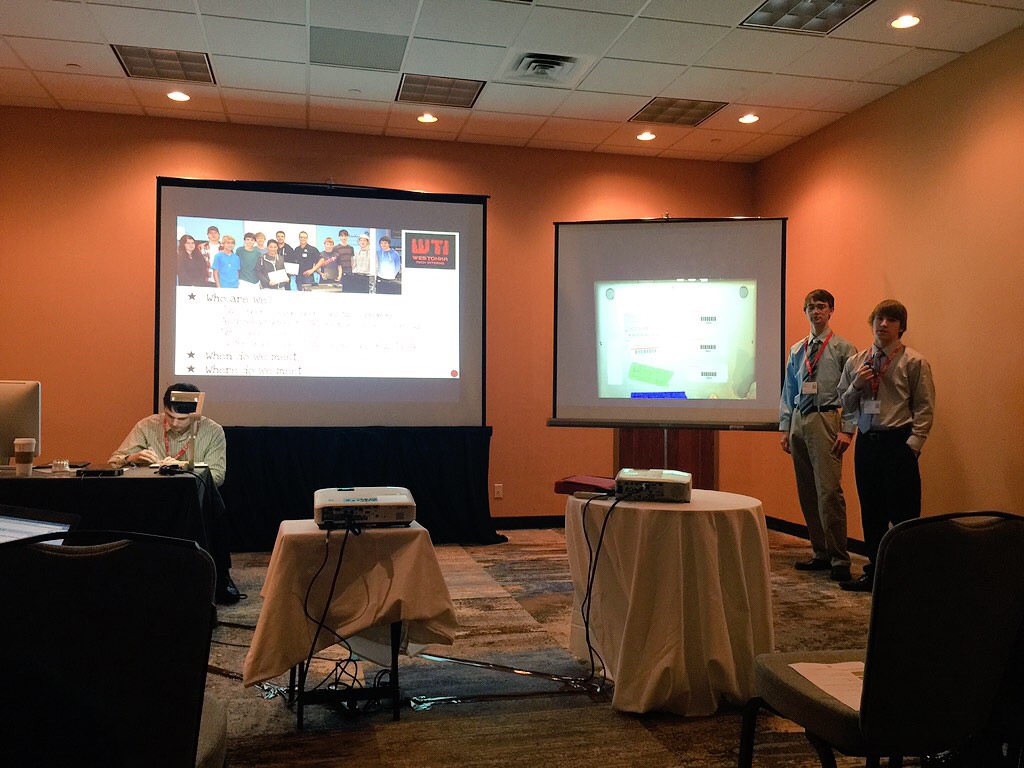
    To start off my two-day learning spree I attended a session presented by Sue Simonson, a Business & Technology Teacher at my alma mater, Mound Westonka High School (MWHS). The session was titled, “Tech Interns: Student Led Chromebook Repair”, and Sue modeled what guide on the side can look like as she had her students present the majority of the session. Many schools have tech interns as clubs that serve in this role as an extra curricular, Sue proposed an elective course that would give students credit for this effort modeled after Leyden High Schools in North Lake, IL. After some convincing of administration, Sue launched this course with 11 students in their junior and senior year (10 male/1 female) in the fall of 2014.

    IMG_1328

    To give some background on the school district, students grades 5-12 each have a Chromebook. In the past, students paid insurance to an external provider, which posed many challenges: costly, long turnaround, lots of staff time managing repairs. To alleviate these issues the students in Sue’s “Westonka Tech Interns” (WTI) course were trained on al things Chromebook, from an external contractor, training included both software and hardware issues. Each student in the district pays $40 for insurance that is handled internally through the district rather than through a third party. The WTI students are the second line of repair after a quick troubleshooting or repair documentation with staff in the media center.

    Results:

    • In the first semester alone, students in WTI fixed 90 Chromebooks, majority of which took two days or less (3rd party insurance can take up to 6 weeks).
    • It is estimated that students in this course spent 40% of their time repairing devices.
    • The other 60% is spent working closely with the IT Director with network, server, and software issues. Students also spend time focusing on Google Time Projects such as app development, learning to code, social meda, and certification.
    • With approximately 900 student devices self-insured at $40 a piece of the year. The district has only spent 10% of the funds thus far on parts and shipping. The district has not yet decided what the remaining funds will be use for at the end of the year.
    • Sue is hoping at add another section of this course next semester to have a morning and afternoon crew.

    *While two of the students presented on the results of the project during the workshop, another student fixed a cracked LCD screen in 20 minutes.

    Next I was off to the keynote, Yong Zhao is a researcher whom I cite a lot in my papers on technology integration. I was blown away by his stage presence; he connected with the audience and was hilarious. Not taking in depth notes, I will refer to Michael Walker’s blog on his presentation: http://edinatech.blogspot.com/2014/12/ties-14-notes-yong-zhao.html?spref=tw

    Zhao told a lot of jokes and shared many points that made you want to stand up and clap. The one that stuck out to me most is when he connected some of our current economic issues with the need to create “out-of-the-basement readiness” for our high school and college graduates. I encourage anyone reading this to check out Zhao’s webpage and review his research.

    After the energizing keynote, I attended Cory Klinge’s session titled “BYOD with Limited Money and Resources” because I am working with a school that is looking to go BYOD and in fact has limited money and resources… Cory modeled the use of Nearpod in his session, an interactive presentation platform, engaging the crowd in questions throughout the workshop. Most of the sessions at TIES are presented in essence as case studies; here is what happened at my school, with my students, my leadership, (the list of variables go on). Here is what I found and here are some suggestions that may or may not work for you depending on your setting. It is important for attendees to think conceptually about the information, remembering there will likely be some tweaks to implementing in their setting. Cory’s session was packed full of resources and suggestions, a few that stood out to me:

    • If students have an issue connecting to the Wifi, they may use their own network which many cause an issue if they are using too much of their families data.
    • The biggest reason Cory wanted BYOD in his classroom is to support formative assessments.
    • BYOD supported a homework free class: formative assessment, quick lecture, activity, video or reading assignment in class, skill check.
    • Do not ask students to bring extra devices they may have because they may not consistently bring them and what happens if another student damages the device?
    • Cory does not recommend that you accept PC’s due to the liabilities.

    After lunch I treated myself to one of my favorite educational speakers on the face of the earth. George Couros is an experienced educator, administrator, now Division Principal for Parkland School Division in Stony Plain, Alberta, Canada. Some things I have observed from Couros’ workshops: 1) Very engaging, the man is a talented story teller 2) You will most likely laugh, cry, and settle on an ugly laugh/cry by the end (that might just be me) 3) He leverages digital content in a way all presenters should 4) I don’t believe he takes a breath the whole time he speaks (nor would I want him to because he has a lot to say).

    The session he led was on the power of relationships, he threaded the life of his grandfather through the presentation beautifully, using childhood home videos. I can’t imagine that any presentation he gives is the same but I would encourage you to check out his past work:

    I took my face full of runny mascara upstairs to an IGNITE session, a new offering at TIES that utilizes a PechaKucha style of presenting, 20 slides with only 20 seconds a slide. The slides advance automatically and you as the presenter really need to practice in order to get the timing just right. I have done this style of presenting in the past, I will admit I learned less from the presenters as I did the presenting…

    1. Given the time you present is so short, narrow your focus vs. giving a broad overview. Seven minutes hardly provides enough time, too broad of a topic leaves you wanting more.
    2. You should not be reading off your slides. This applies always but to perfectly time whatever content you have on a slide to take exactly 20 seconds is very difficult. The slide should merely be a visual that supports the 7-minute story you tell.
    3. Slide design is important… again this always applies. Just because you have limited time to get the point across does not mean slide design should suffer.

    Three cheers for Sean Beaverson, Secondary Technology Coordinator at Bloomington Public Schools, MN. His slides were beautiful and his presentation was poetic, I wished I were listening to him for hours vs. seven minutes.

    IMG_1343

    I closed out the day with a session titled “Data-Driven Technology Promotes Student Learning” presented by Lisa deRoy and Mark Garrison. This session was on BrightBytes a research platform that gathers school district level data and supports decision-making. I have yet to fully dive in and explore the software and questions but I do know this is being widely used in school districts across the state of Minnesota and nation.

    Day one, over and out… lots of new connections and learning. To see reflections on this day of TIES from attendees get on Twitter and follow the hashtag #TIES14 for September 8th.

  • Finishing my M.Ed.

    Finishing my M.Ed.

    This blog post represents a turning point for my final project and me. For my final project I proposed, hired, and managed the integration of an online badging system and project planning tool within the professional development website. What has been two years of exploring, learning, and planning is now coming alive with real web developers and an extra title behind my name.  As I entered the next stage I must give some shout-outs to people who supported me the past two years.

    First and foremost my husband Erik who has more patience than I thought humanly possible. He has been beyond supportive of me following my dreams and using most of my “free time” for school, turning our house into my office, and has allowed me to neglect cleaning anything for some time now.

    Big thanks Joel Donna, Nesrin Bakir, and Angel Pazurek for being awesome advisers during this process. All three have encouraged me to follow my passions and interests and make this process my own. Angel has truly made what could have been a very stressful semester a fun journey.

    The instructors and professors who gave me their all throughout the two years: Diane Laufenberg, Nesrin Bakir, Robert Tennyson, Suzan Koseoglu, Sarah North, Aaron Doering, Luke Lecheler, and Matti Koivula. All of your courses were relevant and well executed. You all modeled for me that online courses can be engaging, constructive, and meaningful for learners.

    All my LT peers, what started off as a group of classmates are now my friends and represent my professional learning network. I cannot wait to continue to learn and grow with you all and I imagine our paths will cross many times in the future.

    To Aaron Doering who inspired me to apply for the Ph.D. program, I am not quite sure what I just got myself into but I am very excited for the journey and the opportunity to work with you.

    To my coworkers, I work with a very encouraging and supportive group of people who have done everything in their power to help me with school. Especially thank you to my boss Kelita Bak for believing in my vision and my cube-mate Elizabeth Koenig.

    And last but not least my friends and family who have put up with my absence and having to say no in order to focus on school. Unfortunately that fact may not change but knowing you will love me anyways makes it better.

    I love the Learning Technologies Program at the University of Minnesota. Every course is relevant, well designed, and has immediate application to a wide-range of professions. It has already opened many doors for me in the for-profit, non-profit, and educational sectors. Here is to the next chapter in my LT journey!

  • Better and Better

    Better and Better

    Modules 4-6 look very similar but their interaction is unique. Each of these modules is some kind of assessment; the difference is whom the assessor is. As we encourage reflection for our students we must as that educators and student project planners look back and evaluate their work. It is through this evaluation that we believe that practitioners, no matter their role, will grow to use service-learning with quality. At NYLC we base the quality of the service-learning on the use of the K-12 Service-Learning Standards for Quality Practice.

    A few years ago NYLC contracted with The Center for Urban Initiatives & Research

    University of Wisconsin-Milwaukee to create The GSN Self-Assessment Guide for Service-Learning Projects. This is a multi-step process that has practitioners self-rate their service-learning project by using evidence such as student work. This rubric will serve as the guide for modules 4-6. Below is an example of one of the rubric pages and a final scoring sheet.

    GSN_Self-Assessment_Rubric_Page_1 GSN_Self-Assessment_Rubric_Page_9

    Members will go through and use the evidence that they uploaded to self-rate using this process. The project-planning tool will not allow the member(s) to use the self-assessment module until the member(s) have uploaded at least 8 pieces of evidence (one for each standard). The rating tool will also allow the member to leave comments. The project will not be complete until the member has completed the self-assessment module.

    Modules five and six are optional but both will be recognized with badges and will use a similar process. Module five will require a GSN member assess another member’s project and provide feedback. The assessor will use the same rating scale, utilize the evidence uploaded by the project planner, and provide comments. The NYLC adjudication is similar but may be more of a back and forth until the member increases the quality of the plan or the evidence. This is a win-win-win situation because it allows the member to have their project “NYLC Certified”, it shows are other members which projects have been stamped as quality, and it gives us at NYLC a solid library of quality projects to use as examples.

  • Laying the Foundation

    Laying the Foundation

    Modules 1-3 represent the unit or project plan for the user(s). It will be in this section that they answer the questions:

    1. What will youth know or be able to do at the end of this project? (Identify Desired Results)
    2. How will you know they have learned that knowledge or gained those skills? (Determine Acceptable Evidence)
    3. And finally what activities or lessons will they participate in to achieve those results? (Plan Student Experiences)

    For each module NYLC will be capturing videos that show projects in that phase of planning and implementing. These videos could capture instruction, interviews with adults or students, or students serving in the community. While it will take time to build the video library to start off we want to capture a K-12 classroom educator at each level (elementary, middle, and high school), a group student (who serve in a youth council of some sort), and an educator that works outside of the formal K-12 classroom in each step of the planning and implementing process. Luckily, we have a budget to make this happen.

    Each project that is featured through video will have the formal curriculum to support ensuring that members can cross reference the larger plan when watching shorter videos. Additional videos could also include mini (3-5) webinars or instructional videos created by NYLC. Each module is set up so that the videos and supporting documents can be modified at anytime because we know that videos age quickly and we want the tool to stay relative and build over time.

    Another constant through the modules will be the presence and encouragement of using the K-12 Service-Learning Standards for Quality Practice. While the modules represent the different steps in the recipe, the K-12 Service-Learning Standards for Quality Practice represent the ingredients. Majority of NYLC’s resources are based on these standards and many of these standards happen naturally within service-learning. However, there are key indicators for using the standards with quality.

    Every module will feature supporting resources to guide users through answering the questions. For instance in module one there will be documents that users can call upon to look up the Common Core State Standards, the Next Generation Science Standards, civic outcomes, character outcomes, and leadership outcomes if they need help defining their desired outcomes. Along with the library of standards, their will be resources to help decide guiding questions as well as unpacking those standards and goals.

    Module two will have supporting resources that support users in defining how youth will prove their growth for the defined outcomes in module one. Again with videos but also with content that teaches how to create a rubric, what are examples of formative and summative assessments, how can young people self or peer assess? Often times the assessment or final project in service learning is the service itself or the demonstration of that service. This can be very tricky because one of the standards for service-learning is youth voice so how can educators ensure that students are meeting the standards but still getting voice and choice.

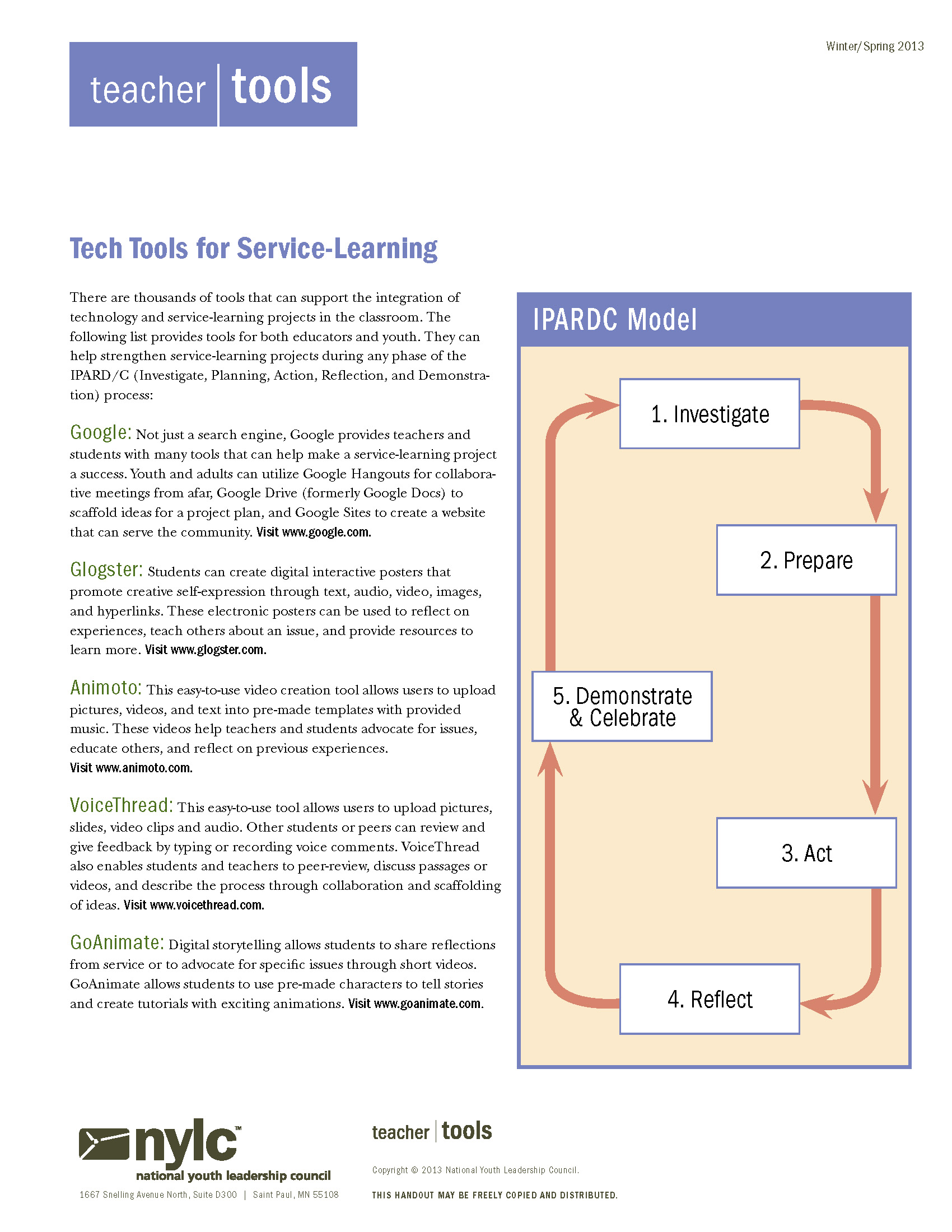
    Module three will use the IPARD model for service-learning to plan the student experience. Often times people start with this step when planning but this is really the student inquiry process for service-learning and doesn’t represent a full plan. For each step of the IPARD process we will have supporting resources:

    IPARD


    via gsn.nylc.org

    Investigation: community research, inquiry based lesson, defining the community need

    Planning: how the need will be met, student roles and collaborations, who in the community can you call upon for support

    Action: direct, indirect, or advocacy, addressing the root cause vs. putting a band aid on an issue

    Reflection: cognitively challenging reflection, happens before during and after, multiple intelligences

    Demonstration: reporting results to the community, proposing next steps, engaging important stakeholders

    Modules 1-3 will have a similar feel, after a member plans module 1-3 they will go back and add evidence as their plan comes to fruition.

  • Hard Hat Area

    Hard Hat Area

    Based on my research there is not a project-based learning tool or a service-learning online multimedia tool that guides educators or students through the process. There are a lot of worksheets and handouts but nothing interactive or engaging.

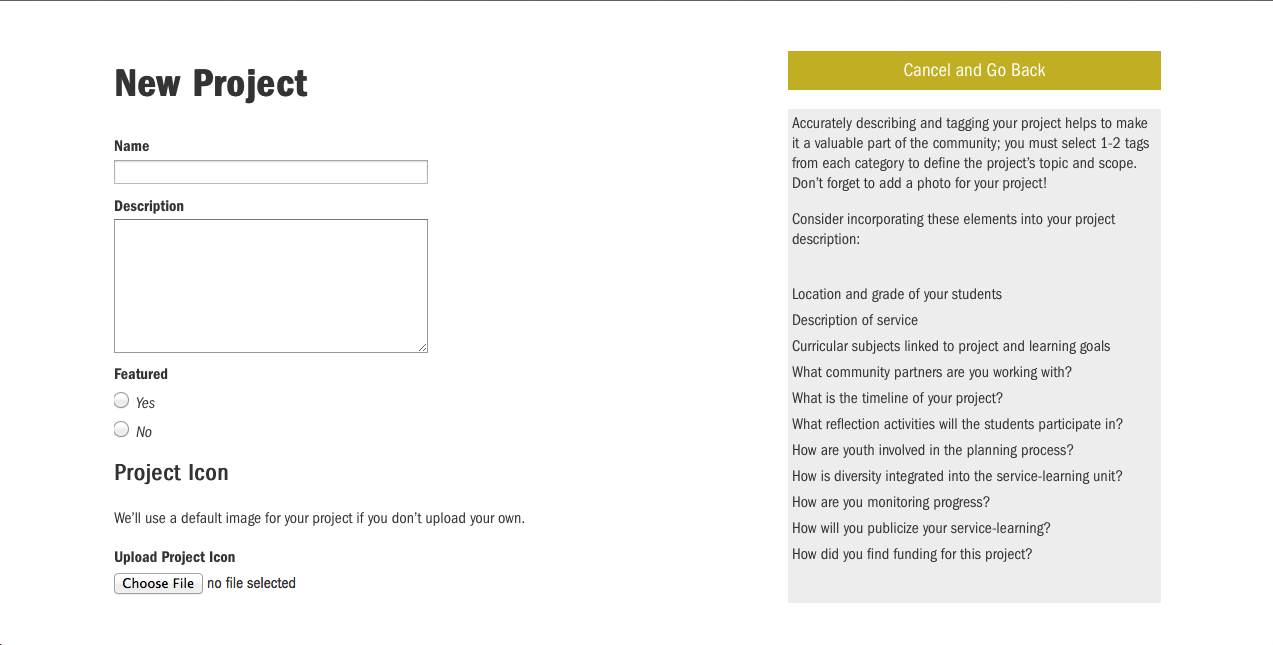
    Currently on our site a user titles their project, then adds a description, some “tags” to make it easier to search and then publishes. Leaving it up to them if they are interested in adding additional resources such as unit/project plans, supporting documents, pictures, or videos. Since there is no incentive for doing so, unless being directed by an instructional coach or program coordinator many projects are left unfinished. Which leaves us with a library of half-ideas for projects. We encourage and take pride that users upload their projects at the inception of the idea vs. when the project is complete but often that strategy backfires.

    Screen Shot 2014-05-08 at 6.04.09 PM Screen Shot 2014-05-08 at 6.04.29 PM

    Hopefully with the integration of the project-planning tool it will better guide members in sharing specific details and helpful pieces of evidence. By integrating the digital badges members will ideally feel incentivized to continue working on their project. Another feature that will support this is email reminders for those who have begun projects but then deserted them.

    In the simplest form, this is how the tool will work. Modules 1-3 will guide the user through a series of questions based on what NYLC believes are the best steps for planning. The questions will all be guided with resources to help the user(s) plan their projects.

    PPT 1

    Ideally, this happens at the beginning before the project happens but if not the users can retroactively share what happened. From there before moving onto module four the users will upload pieces of evidence which could be student samples, newsletters about the project, videos from class or media coverage, pictures of students working, etc.

    PPT

    The tool will require them to upload five artifacts or pieces of evidence before moving onto module four which is self-assessment. At this point the user’s project can be complete, or they can choose to enter their project into a queue to be peer-assessed. The peers will use the evidence and artifacts to rate and give feedback to their peer. Both the project creator and the assessor will receive a badge for participating. If the project creator wants to complete the full cycle, they can submit their project for NYLC adjudication. The only catch is that will be for a charge because it requires staff time. If the member is a part of a specific NYLC program they may be granted a code to bypass the fee.

    PPT 2

    Without getting too far into details about the specific modules some overall tool will include the following features:

    • Multiple members may co-create projects
    • The user(s) can print at any time
    • The user(s) will receive email notifications if:
    1. Their project has been sitting too long in steps 1-3 without updating or evidence added
    2. Their project has steps 1-3 completed and evidence added but hasn’t been self-assessed.
    3. Their project has been peer assessed
    4. Their project has been NYLC assessed
    • As soon as they move to the next module their project will be saved
    • Members can go back and forth between modules or just use the tool as a professional development opportunity

    Alternative uses

    Many service-learning organizations and funders offer small grants $500-$10,000 to schools and classes for service-learning projects. Many of the grants ask similar questions to our module 3. If educators and youth are already going through this process to share their project, why not make the grant application within the same tool? The GSN gets more content, the tool has multiple purposes, and the grant applicant gets support along the way. The grant module would feature any additional question that the funder or program would need addressed in order to be processed. This may be logistical questions, information about their specific issue area, or other questions. The module would be modified based on the grant application.

    From there, NYLC can pull the applications, judge them and award the best ones a grant and a badge.

    PPT B

  • Project-Planning Tool

    Project-Planning Tool

    While this semester, my growth and learning in terms of learning technologies has primarily been focused on digital badges, it really only represents half of the updates I am making to the online community. The second half is the creation of an interactive, multi-media, service-learning project planning tool. The need and idea for this tool came from several areas:

    Service-Learning often gets a bad wrap in the classroom because people are not planning or implementing with quality. Either their focus is too much on the service or it becomes project-based learning, both equally good things amongst themselves but they are not service-learning.

    We see educators and students starting with the genuine community need, planning activities, and loosely tying it back to goals and outcomes. These projects may have impact on students but often focus on the “nice-to-know” vs. the “need-to-know”. And with the continued focus on accountability schools do not have time for the “nice-to-know”.

    yourprezi_Page_04

    We also see educators and students using the K-12 Service-Learning Standards for Quality Practice as their planning tool. And while the standards do represent the best practices within service-learning, amongst themselves do not provide enough support to bring students from A-Z.

    yourprezi_Page_05

    A widely used model for planning service-learning is the IPARD model: Investigation, Planning, Action, Reflection, and Demonstration. It is similar to many inquiry models in education but this is the process the students go through and before we get to this process, educators should have their goals and outcomes defined and their assessments mapped.

    IPARD


    via nylc.org

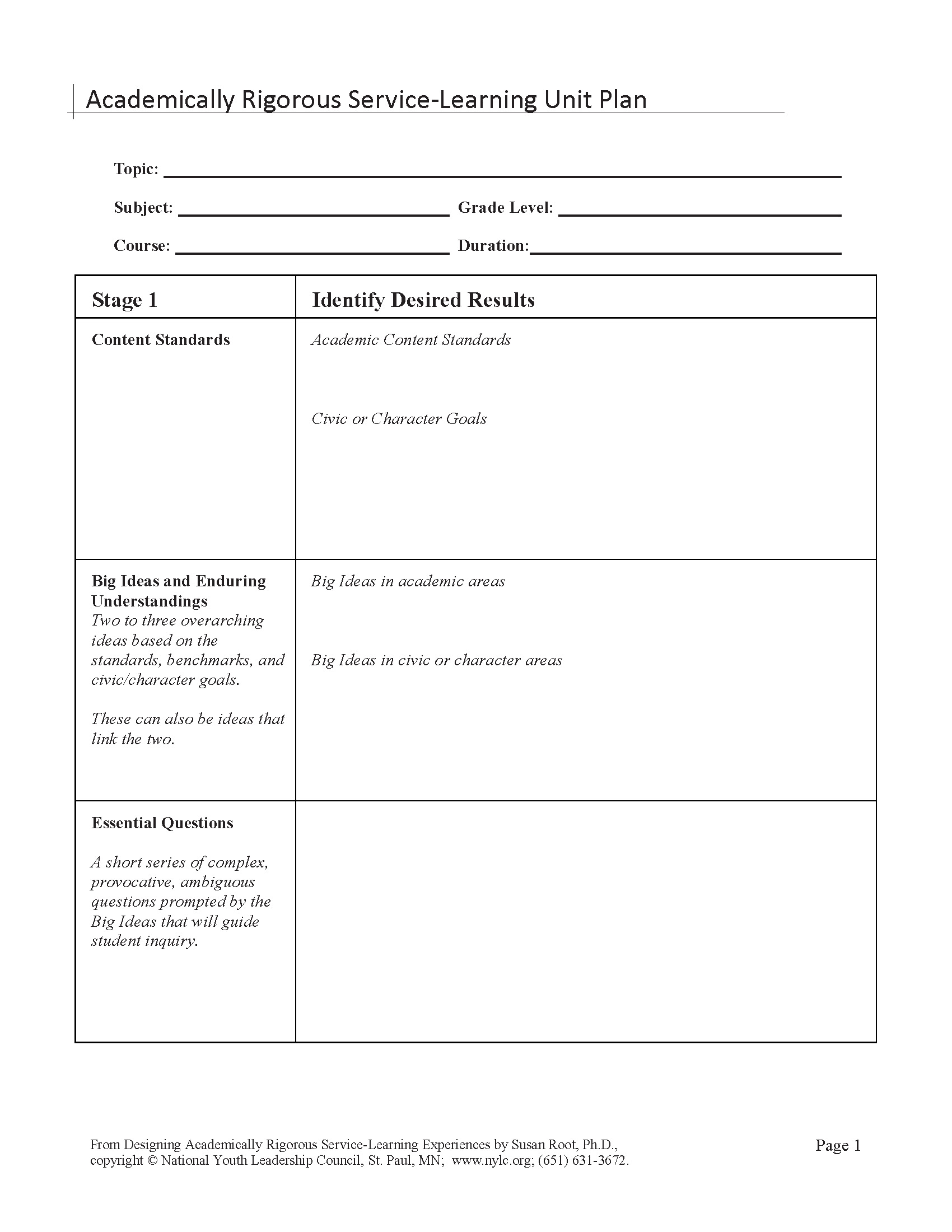
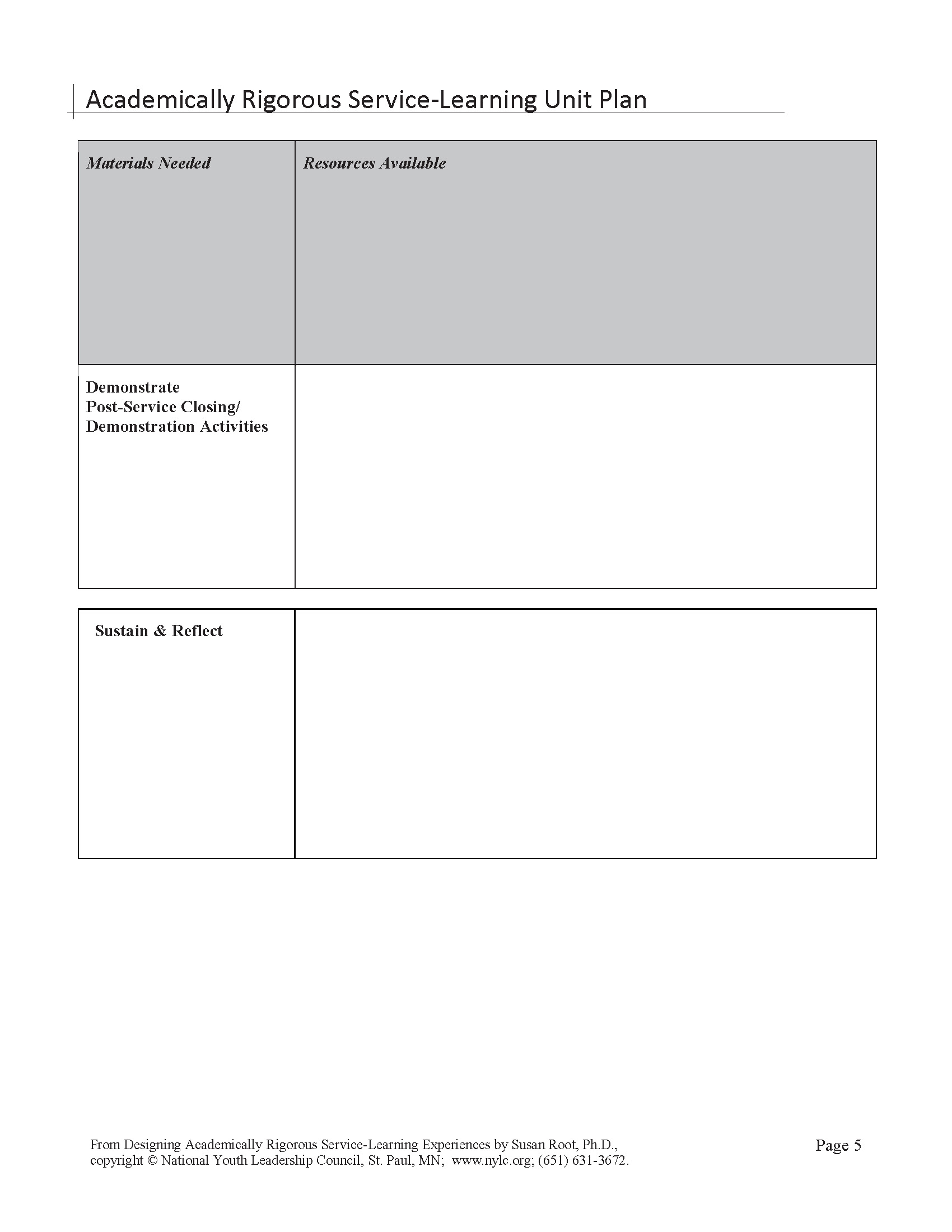
    Hence, NYLC wants to create an interactive project planning tool to guide teachers through the planning process to ensure that service-learning is planned with quality. Our past Research Director, Susan Root, used Grant Wiggins and Jay McTighe’s Understanding by Design to create a planning form and supporting trainings that we believe leads to quality service-learning projects.

    NYLC SLPlanning doc_Page_1 NYLC SLPlanning doc_Page_2 NYLC SLPlanning doc_Page_3 NYLC SLPlanning doc_Page_4 NYLC SLPlanning doc_Page_5

    Here is the challenge, educators (in particular those serving in a formal pre-K through 12 settings), only represent a portion of who will be using this tool. We want this tool to be applicable and useful for all of our members which includes youth ages 13-24 and adults who do not serve as a K-12 educators (including Higher ED). We need to modify the process so that everyone can relate and understand the process no matter what setting they are in.

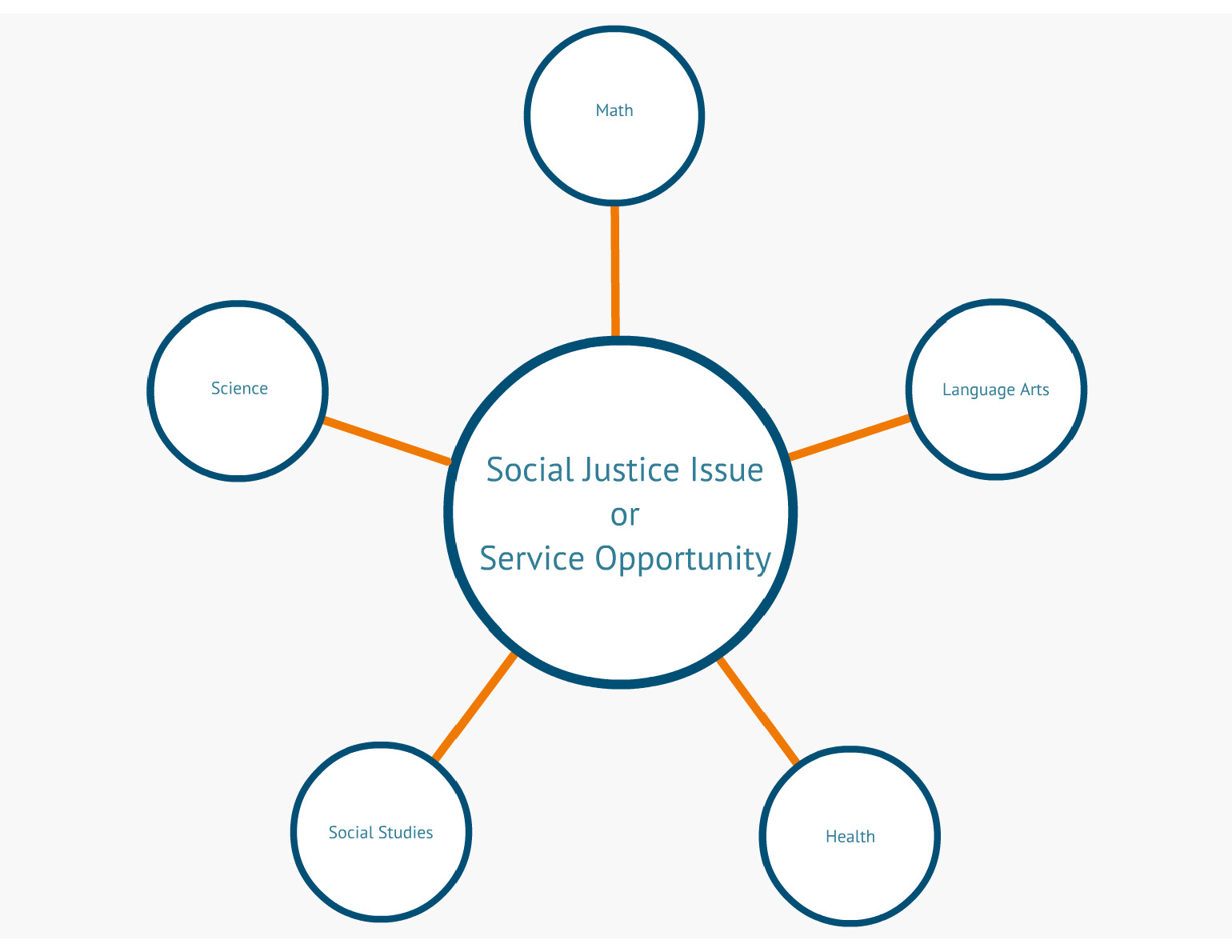
    Not everyone who is using service-learning has a curriculum to base the project on. That being said, they still should have defined goals and outcomes for the participants (even if they are the participants) before they begin the project. For example, a student group may decide that they are looking to grow as leaders. In particular, they would like to grow their skills and knowledge related to public speaking and project management. They would create clear goals and outcomes for that growth before the project begins.

    To appeal to a large audience this tool also cannot look like a blank worksheet, in fact I am not sure what audience that would ever appeal to. One tool that was created 3-4 years ago was Lift. Lift is a multimedia tool that follow three schools (one elementary, one middle, and one high school) from around the country that NYLC believes has an exemplar service-learning program. The tool is colorful, has dynamic videos, downloadable resources, and reflection questions. People from around the world call upon the Lift to see what the K-12 Service-Learning Standards for Quality Practice look like in person.

    There are some problems with the tool. The first being that it is built in flash and not accessible for many mobile devices, making it difficult to access for some. The second is that it is yet another website for NYLC to maintain and takes people away from the GSN. The videos and content within the site are not easily changeable; in order to add new schools many videos would need to be re-edited. NYLC staff does not have access to add and remove tools from the site. The Lift also needs to appeal to a large audience but in doing so leaves out opportunities to feature content that specific audiences may find helpful. For example, there is a lot of video of students in-action planting trees and working collaboratively but less of the instruction in the classroom.

    In a past blog you saw an overall concept video that I shared with the RFP bidders. Building on the design in that video, the next few posts highlight more in-depth planning of the project-planning tool (which seriously needs a new name). Using all of the inspiration and lessons-learned above.

  • Big Bad Badge Plan

    Big Bad Badge Plan

    Hopefully, by now through the blog my readers have an idea of my large-scale vision for the digital badges and project-planning tool. The further the project moves forward, the more details I need to figure out. The bidders for the RFP had a lot of great questions for me and through providing answers my plan begins to build. Specifically what badges we want to offer is something I have been grappling with for some time.

    In the fall of 2013 through my practical research course I created a research proposal that stated I wanted to increase autonomy, relatedness, and competence in which based on the Self-Determination Theory created by Edward L. Deci and Richard M. Ryan.  I am arguing would hopefully increase motivation for our members. Motivation for what? Well motivation to participate in NYLC’s programs both online and in-person and our programs. Our programs are based on NYLC’s mission which is:

    to create a more just, sustainable, and peaceful world with young people, their schools, and their communities through service-learning.

    I have struggled through this argument a few times because Deci, Ryan, deCharms, and others have wrote about the effects of using rewards and the effect it has on extrinsic vs. intrinsic motivation. Not considering the power that badges could have, especially if we as an educational field can build common ground around the worth and value exchange of badges. In the least, if you consider offering badges to my members for their actions is almost like giving them a special cookie every time they do something I want them to do. What do I want them to do?

    Engage with their peers, learn more about a powerful pedagogy, make plans to make the word a better place, share their knowledge and expertise, change the lives of young people whom they work with everyday by showing them that they have power and voice in this world. If initially, my members engage more because of the badges, the rewards, the external acknowledgement, I don’t care. I have seen lives changed, professions refreshed, and classrooms, schools, and districts turned around completely because of the use of service-learning as a powerful teaching strategy. That is where the intrinsic rewards will come through.

    Let me cautiously jump off my soapbox quickly to show you my plan for the digital badges. I shared in my earlier blog post that I loved how Buzz Math organized and shared the details of how to earn badges. In retrospect, my only addition to that and maybe this is possible once you actually sign into Buzz Math is that I would love for you to see exactly who has earned that badge.

    The first step in designing the badges was creating a logic model. This is my first attempt and there may be some holes in my theory but somewhere to start and discuss:


    Badge Logic Model

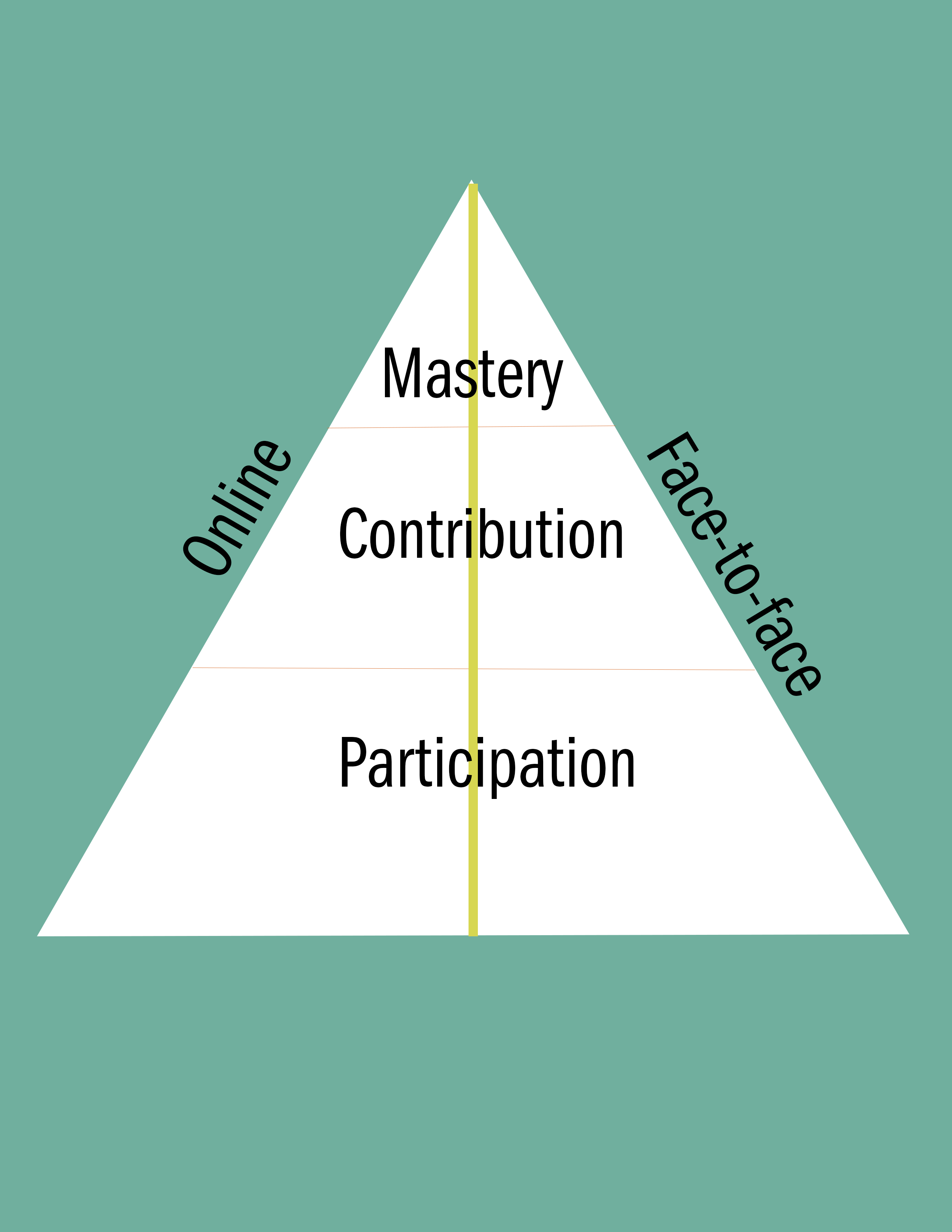
    From there I move to design, a few years ago I went to a training on engagement pyramids for non-profits. Using their logic, I modified my pyramid to relate to my needs. This is my engagement pyramid acknowledging member’s behaviors from just being present and participating to contributing and then mastery.

    Pyramind of Engagement 2

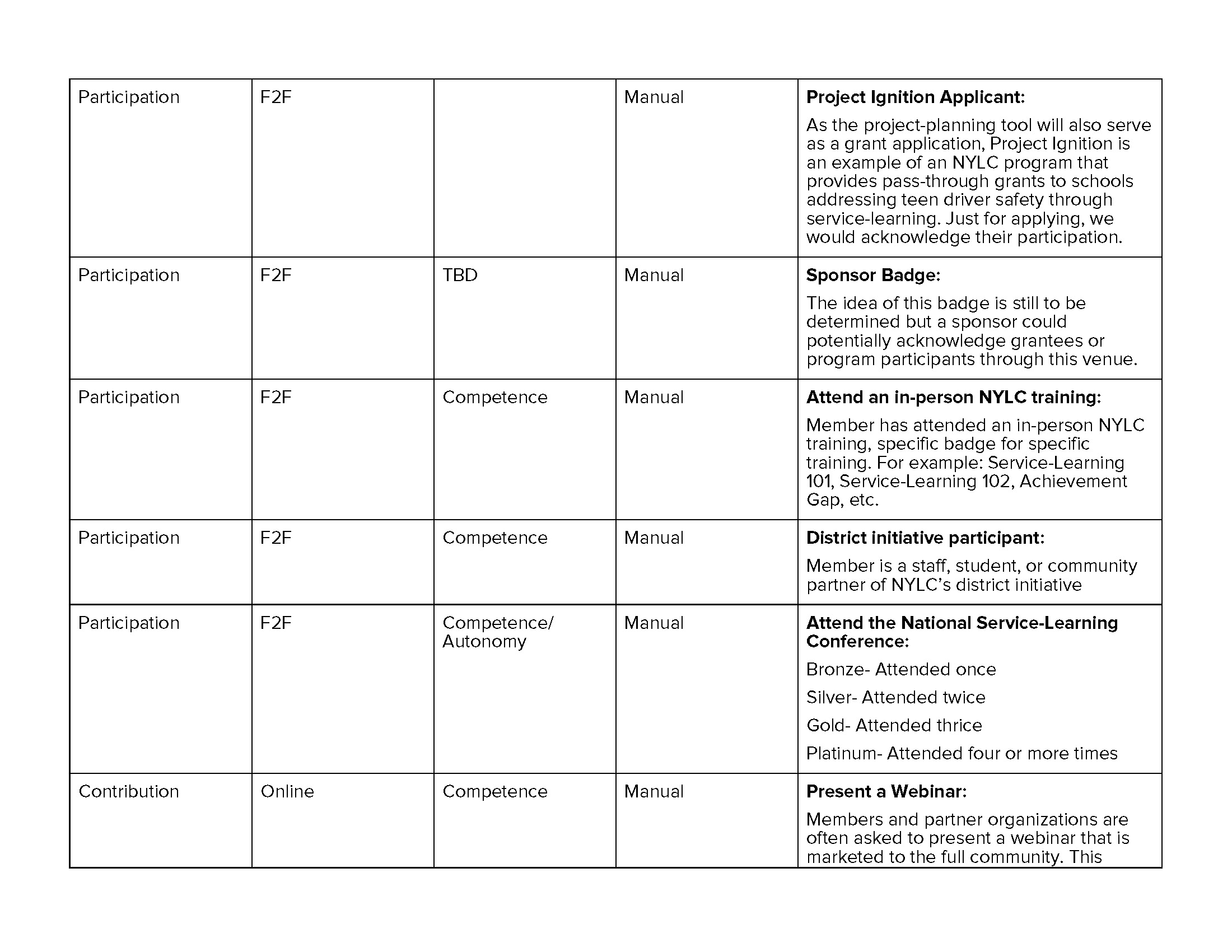
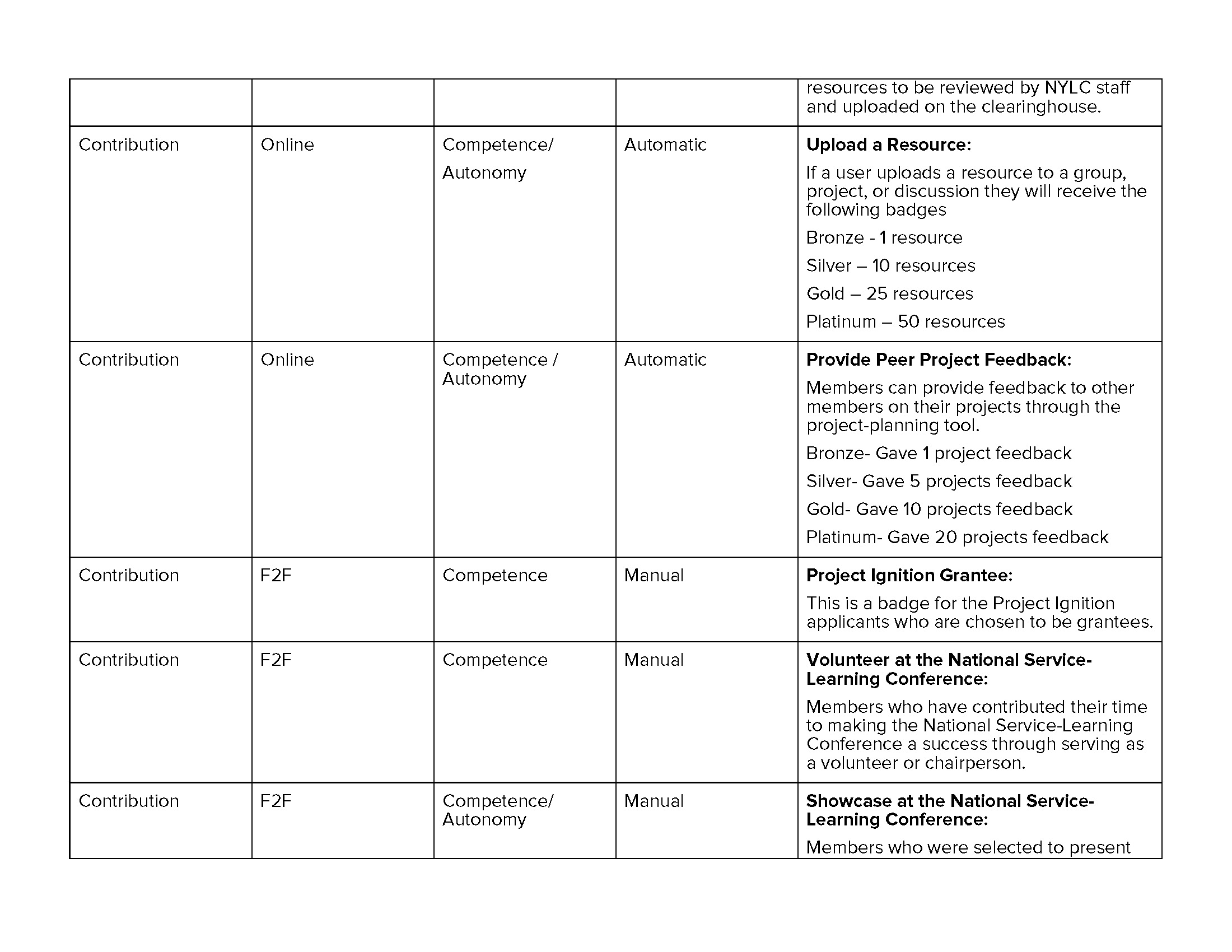
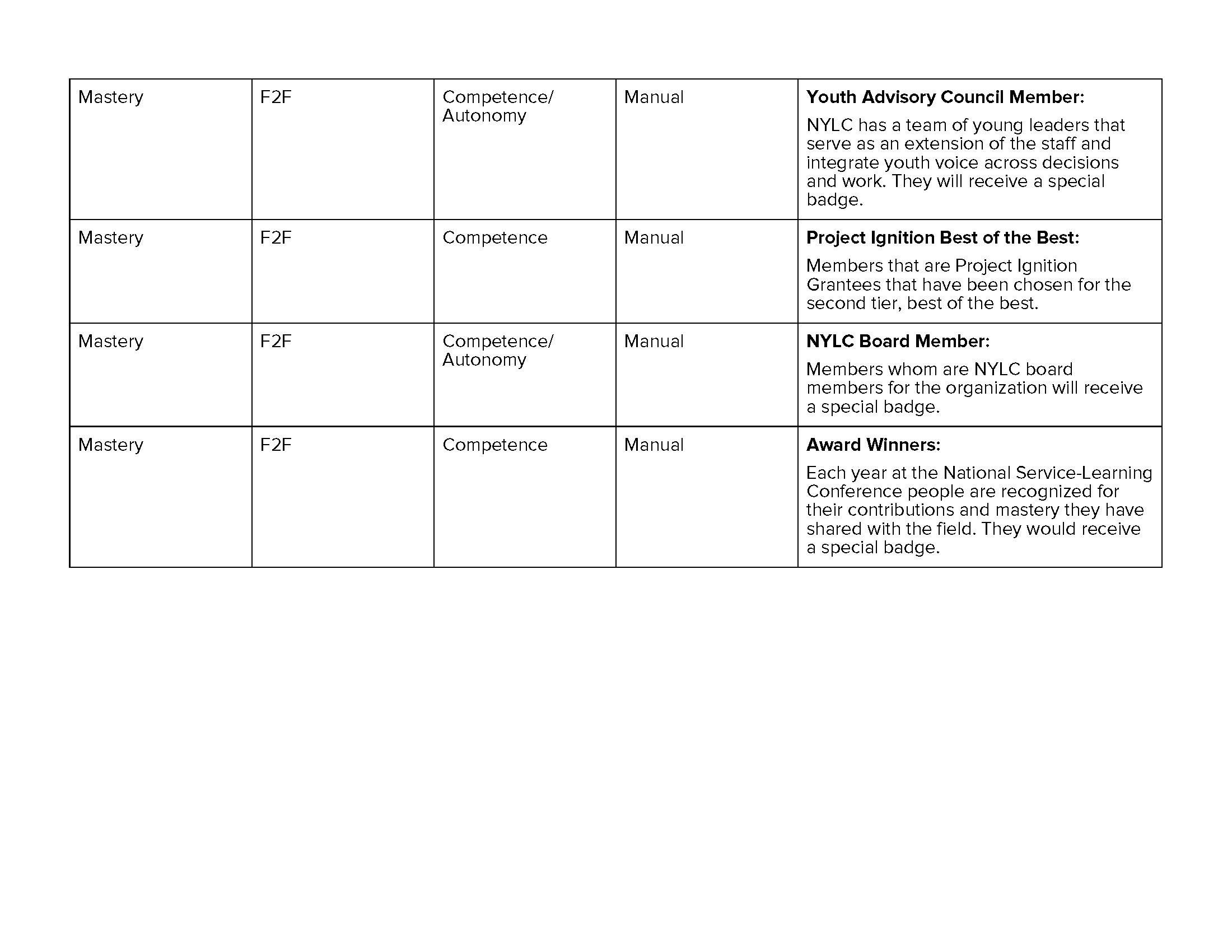
    From there a breakdown of badges in each area I am calling the GSN Badge Matrix. A never-complete guide to the badges that you can earn from both online and offline participation in NYLC’s programming. I say never-complete with pride as we continue to build and grow at NYLC. As we develop more online tools, events, trainings, and programming we want badging to be a core element across. Thus this badge plan will always serve as a working document.

    Badge Matrix_Page_1

    Badge Matrix_Page_2

    Badge Matrix_Page_3

    Badge Matrix_Page_4

    Badge Matrix_Page_5

    Badge Matrix_Page_6

    Badge Matrix_Page_7

  • Answers Vlog

    Answers Vlog

    Thanks to an old colleague who was willing to be contracted quickly we were able to answer the technical questions for the bidders, the answers do not make for the most riveting blog post but comment below if you disagree. For the content related questions, I created the video below using the assignment I had created in CI 5336.

    Follow up questions after the video:

    Will we need to plan for payment processing on the NYLC assessments? Online checkout, etc? I’m guessing no, but I want to make sure.

    Yes, actually that would be the ideal if people could submit their payment right in the module. I am not sure how else it would work without a lot of extra administrative work. The simpler the process the better.

    For Badges, how many categories and how many actual badges do you envision overall? (5 categories, with 4 levels of badges each -bronze thru platinum).

    On the last slide it indicates at this moment, how many badges we are planning on distributing. The badges with the blue text indicate that it would likely require us uploading an excel and the badges with an asterisk indicate it would be a progressive badge: bronze, silver, gold, platinum (four levels).

    That being said, we want to be able to create our own badges as we go that obviously will not be able to be triggered by anything in the online system but administrators can give out for program related content.

    SCOPE of WORK
    • Is existing codebase viewable? If not full source the Gemfile definition to see full application framework stack.– Did the code I sent you cover this question?
    • What is the current state of test coverage?
      • What test frameworks used? (Rspec, Cucumber, etc)– Cucumber
      • What coverage exists? (unit, functional, etc) integration, unit, and performance
    Project Plan
     
    • Interactive modules with supporting resources and videos
      • What are all the resources you want to support? (video, audio, text, etc) Video, audio, text, pictures, PDF and word documents
    • Members will have the opportunity to earn digital badges throughout the project planning process.
      • Is the criteria for these thresholds already established? No, I am assuming they would need to answer all of the required questions to earn the badge for that step.
      • Offline credit upload – What format? (csv, xls, etc) xls
    • Members can publish their project to the site at any time, request feedback, and print.
      • Through the editing process, what sort of data retention is required?  Drafts, published versions, etc. I think their responses should publish as soon as they share them, even if they decide to go back and change them. I think anytime they make a change to their project plan whether it is additions or changes it should automatically save.
    • The fifth module is a peer assessment where members can elect to have their project peer assessed.
      • Does this process already exist (assumption is the Service-Learning Self-Assessment is a pre-existing tool/system). Attached.
      • What does this entail? Rankings?  Written feedback, etc. Rankings, and written feedback but the member assessing must be able to see the evidence and the user plan at the same time they are assessing.
    • Updates to the project can be made at any time by users.
      • See data retention/drafts question above.
    • Every section of the project plan can be updated at any time with evidence from the member.
      • Is the evidence made up of the same resources attributed to the project during creation? (video, audio, text, etc) Yes, Video, audio, text, pictures, PDF and word documents
    Grants
     
    Are there more details available for this portion of the project?  Current assumptions from the video are:
     
    • Grants are available for a limited about of time. Yes
    • Any project can apply for a grant, as long as it is currently open. Yes
    • There are core Grant questions that are asked of all applicants. Not that I know of at this time, I think depending on the funder, these may change.
    • Each grant can have additional custom information that needs to be submitted.  As such, a flexible form builder will be required that can support creating questions such as:
      • Text/Essay entries
      • Multiple Choice answers
      • Uploading of resources (video, audio, images, etc) Yes
  • Questions Roll In

    Questions Roll In

    The RFP had been floating around the interwebs for approximately two weeks when the follow up questions began to roll in. Since this process is new to me, I was really not sure what to expect. Below are a series of questions that were asked to me through email:

    Where is the site hosted?

    Can we obtain access to the source code, some or all, to review so we know the quality of code we’ll be working with?

    What database does it use?

    Does any of the existing major functionality of the site depend on any 3rd party gems (aside from the core Rails ones)?

    Are they using a CDN (such as Amazon S3) for any storage?

    The expectation that the two new functions of the site (the badges support and the planning modules support) would be integrated directly into the existing site code, or that they would be bundled gems?

    Are there any restrictions on which 3rd party gems can be used the site?

    Is the existing code currently stored in a code repository, such as git or svn?

    How well tested is the existing code on a unit-testing level and on an integration-testing level?

    What testing framework (RSpec, TestUnit, Cucumber, etc.) is used?

    Could you send a copy of the existing code base, schema, or object model? (this would answer a lot of questions…)

    Could you send screen shots, or a login to the current administrative interface? If you have a staging/demo environment, that would work as well.

    Could you provide more detail on how you see the modules behaving? Are there a lot of fields to fill out? Is it one long page? Are there new files/videos/etc for each module?

    Will modules be visible to non-authors? Only after they are published? What all will be visible to non-authors?

    Are the modules linear or can users jump around and complete modules in any order?

    Could you provide examples of how a user completes a module? Can this be done by only the project members, or does a community manager/admin play a role?

    Do you have community managers today? What access do they have?

    Could you provide examples of some of the badges you expect to use?

    How many badges do you anticipate having? Would you like us to provide the design assets for these?

    Could I ask what your target budget for this project?


    Some of those questions I can answer but a lot of them seem to be in a different language. My organization is small but mighty, we are a programs organization focused on youth development. We do big things with a small budget and that budget does not include a lot of IT support unfortunately. Through this process I realized those were questions I should know or at least someone at my office should know but we don’t. What made a difficult situation worse was that the person who did know those answers (our current developer) was also bidding on the project so it was a conflict of interest.

    These questions only represented what was emailed with me. Which is also another lesson learned. I thought in the RFP I was clear on the process but now reading back, I wasn’t. In my ideal world everyone would submit their questions through an email so I could collect them all and answer them all at once through a bidders conference call. Instead I had eight different vendors sending me requests for individual meetings all asking me similar but different questions. In the future, I will be clearer with my directions and stricter on the process because it in end it was more time consuming than necessary.

    Another reflection on all of the questions asked was that every vendor asked different questions. Some had a lot of more tech-based questions, some focused on what our relationship would be, some wanted to know more about the plan for content. There was a lot of discrepancy in the essential information needed to move forward. In general, I learned I needed to be much more detailed in the future.

  • Combatting Complacency

    Combatting Complacency

    I spend most of my time selling the idea and training on service-learning. I rarely, however, get the chance to sit down with a group of folks committed to service-learning as a best-practice pedagogy and analyze the method. That is why some of my favorite service-learning discussions happen with members who work in higher ed settings. Although I am committed to training on service-learning in the K-12 education field, I find university faculty more willing to talk openly about its challenges and successes with a probing eye.

    On Friday, April 5, I had the opportunity to attend a discussion titled “Combatting Complacency: Challenges of Advancing a Critical Service-Learning Pedagogy”, led by Professor Tania D. Mitchell from the University of Minnesota. Professor Mitchell shared some of her research on the difference between “traditional” and “critical” pedagogy within service-learning. Critical service-learning is focused on social change and redistribution of power, which causes service in the first place. This method is change driven, versus need driven, and sees community partners as teaching partners.

    This made me think of the K-12 Service-Learning Standards for Quality Practice, and how people use the eight standards for planning or to ”check off” their progress along the way. How many teachers have sat down and really studied the indicators for those standards to really assess whether or not they are truly meeting those teaching practice standards in their classroom?

    DSC_0339

    In her many positions at a range of universities from Amherst to Stanford, Tania has served in many different roles related to service-learning and culture. She stressed that it is a hard to find a balance between encouraging teachers to integrate service-learning as a methodology, and to think beyond the “my students volunteered X amount of hours in the community resulting in $X contributed because of their service” mentality. I struggle with that same balancing act as a professional development manager; I want to encourage teachers to try, but I also want to give them the push to create real change.

    Inevitably, these discussions led to the institutional barriers that higher ed schools face, including the integration of technology, which, to me, was not the intended focus of the discussion, but it was hard to ignore. Hurdles such as the school calendar, tenure procedures, job descriptions, ease of integration, the marginalization of serviced-learning, professional development, language and definition, humanities vs. science-based courses, and students not seeing the community around the university as their home were all mentioned as barriers that faculty in the room face. The answer to all of these seems to be a shift in culture, starting with the leadership.

    In closing, I ask everyone reading this from any setting: Are you, or the teachers you work with, using a traditional or critical approach to service-learning? What are the hurdles you are facing institutionally to service-learning, and how can we work together around those?

    To read more about critical pedagogy in service-learning, visit:
    Traditional vs. Critical Service-Learning: Engaging the Literature to Differentiate Two Models
    , Tania D. Mitchell
    Critical Consciousness and Critical Service-Learning at the Intersection of the Personal and the Structural, Etsuko Kinefuchi

    Originally written for and posted on the National Youth Leadership Council’s blog

  • The Generator, Winter/Spring 2013

    The Generator, Winter/Spring 2013

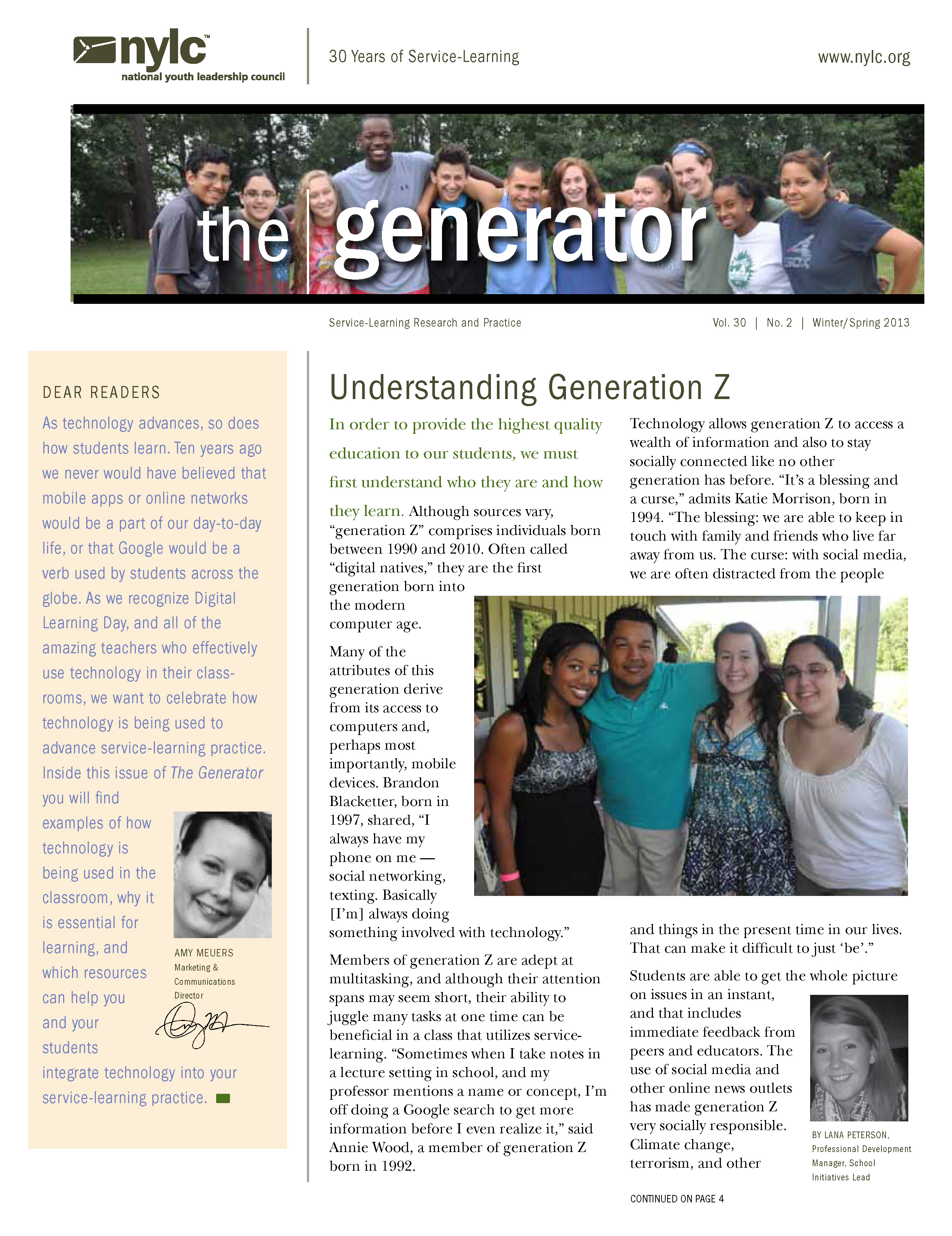
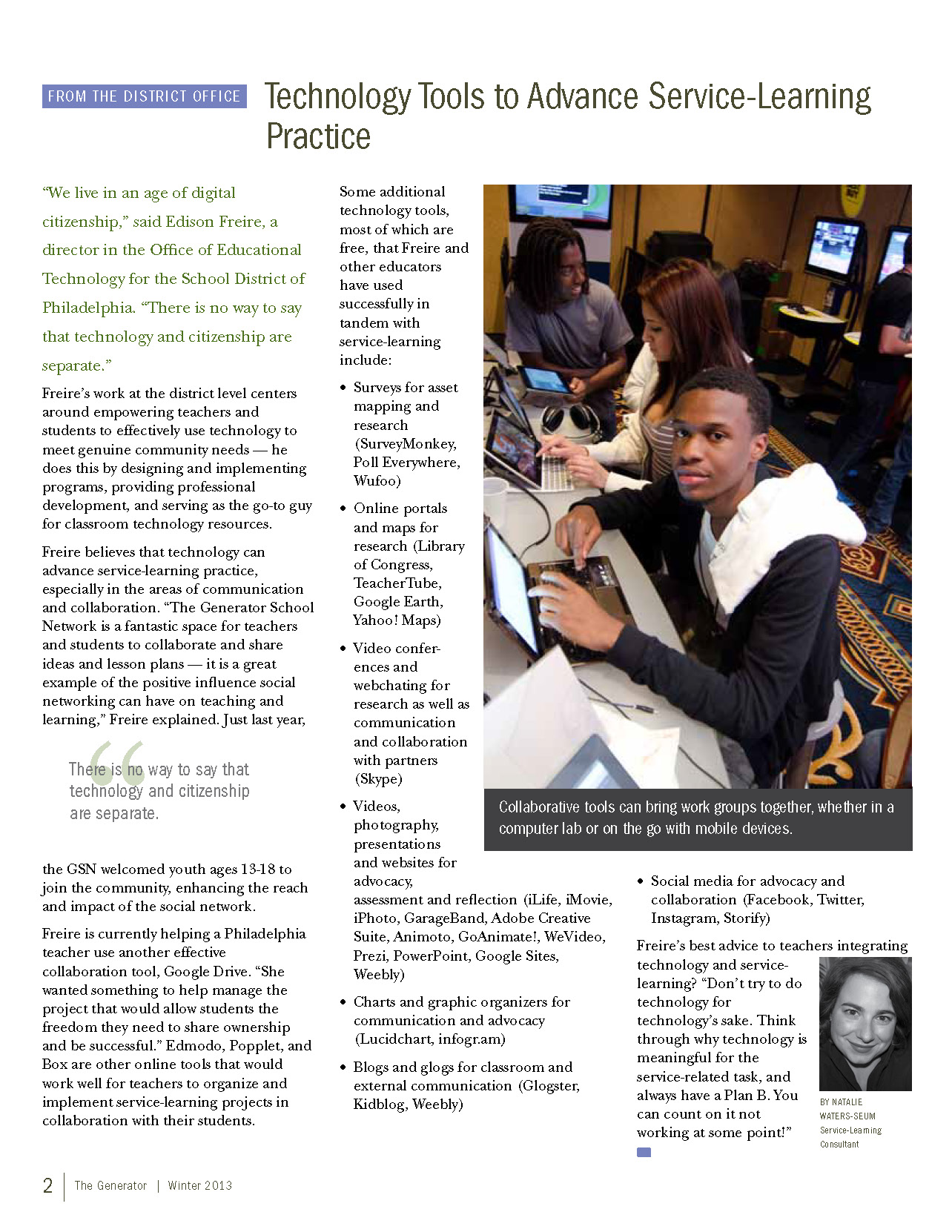
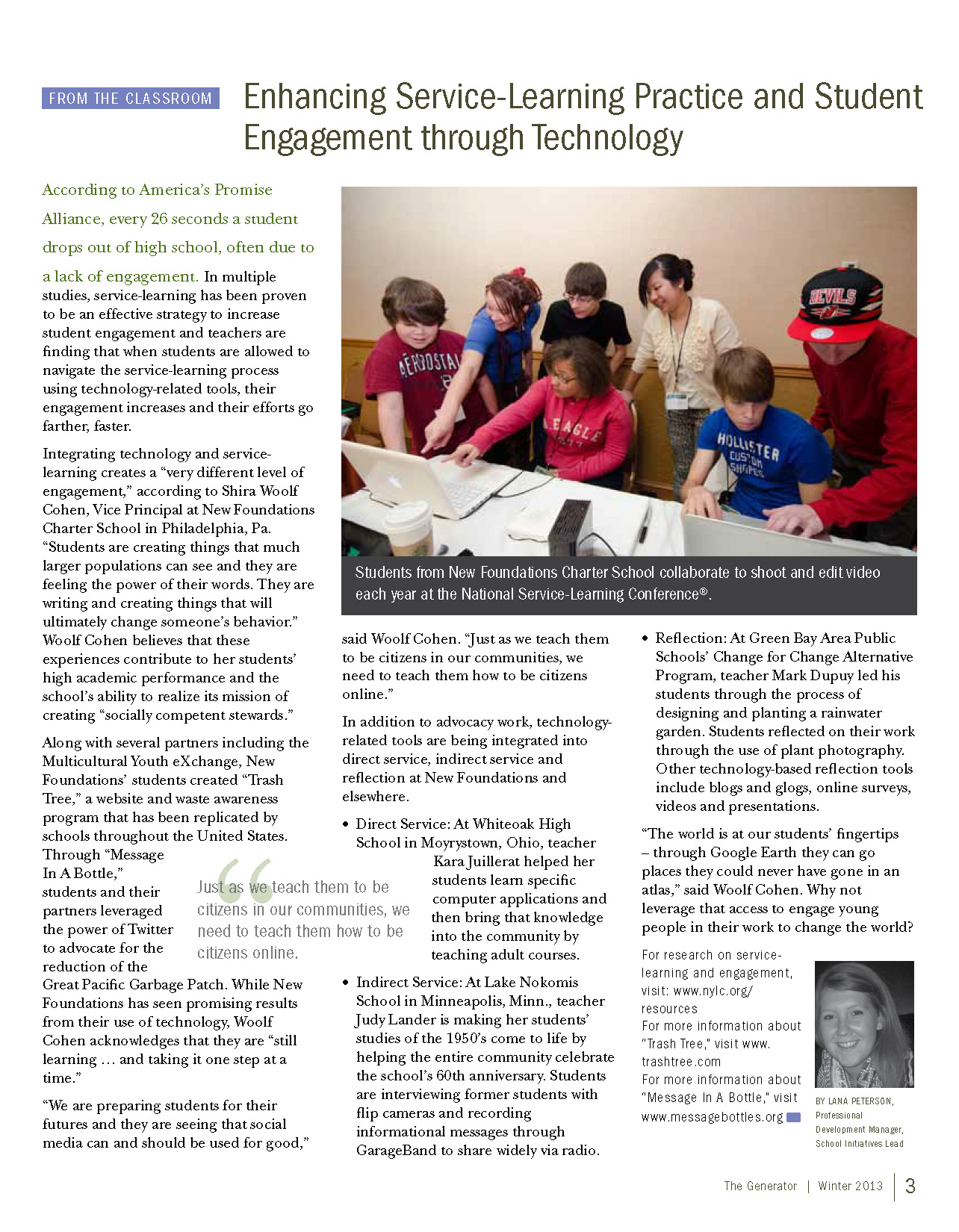
    With this issue of The Generator we explore the expanding role of technology in the classroom and how it can improve service-learning work. Read about how the school-age students in Generation Z see and use technology in their lives and how that changes their approach to learning. Get a list of online resources that can enhance your classroom work and student engagement. Learn how New Foundations Charter School has integrated technology into their service-learning work  in many different projects. This issue includes a Teacher Tools tipsheet with even more great technology resources.

    Publication year:

    2013

    Authors:

    Amy Meuers

     Lana Peterson
     Natalie Waters-Seum
    GeneratorWinterSpring2013_0_Page_1 GeneratorWinterSpring2013_0_Page_2 GeneratorWinterSpring2013_0_Page_3 GeneratorWinterSpring2013_0_Page_4 GeneratorWinterSpring2013_0_Page_5
  • Focus Group Feedback

    Focus Group Feedback

    DSC_0885

    Each year the National Youth Leadership Council convenes the National Service-Learning Conference. This year was the first time the event took place in our nation’s capitol, Washington D.C. Like every other year, the event was inspiring, educational, and energizing featuring speakers such as Sandra Day O’Connor, Philippe Cousteau Jr., and Cassandra Lin. The National Service-Learning Conference is made up of 40% young people under the age of 24 and represents the GSN’s audience of adults and youth engaged in service-learning.

    DSC_0938

    To capitalize on the opportunity we host focus groups each year with a set of youth and a set of adults who are GSN members. Each year our questions shift slightly depending on what we are trying to find information about. This year, given the updates to the GSN we asked about motivation and incentives. While we learned a lot from our members for future updates the two pieces of feedback the stood out related to digital badges and the project-planning tool were certificates and mobile access.

    Educators are required and encouraged to engage in professional development to stay certified and move up the pay scale. In order to prove this, they must have documentation from the professional development organization. This made me realize that every member who earns a badge should be able to print out a certificate with their name on it and an explanation of what they had to do to earn the badge. For students this could count towards school or extra curricular activities as well.

    The second suggestion of mobile access made me realize that I should have required the updates made to the GSN to be mobile accessible in the RFP. The question is, if one part of the site is optimized for mobile use but the other isn’t, is it still helpful. This can be a question for the bidders.

    DSC_0102

  • RFP

    RFP

    After many revisions, brainstorms, procrastinating moments, it is here: the RFP for the web development work on the GSN. It may have taken me a long time because I had no idea what I was doing. It was also difficult because the digital badges and the project-planning tool are two different projects but they will need to interact. There were some resources I called upon in the process.

    The first resource, which I found most valuable, is from the Warehouse Education and Research Council; it gave me a step-by-step process for creating the RFP.

    Some other resources that I found helpful were:

    FivePaths, LLC

    Confluent Forms

    Tech Soup

    Net Dynasty/Priority Net Marketing

    The Nerdery

    So without further ado below is the RFP we published on May 31st, 2014. A special thanks to my boss Susan Valdés, and my colleagues Amy Meuers and Davis Parker for their editing: NYLC RFP 033114

    NYLC RFP 033114_Page_1 NYLC RFP 033114_Page_2 NYLC RFP 033114_Page_3 NYLC RFP 033114_Page_4 NYLC RFP 033114_Page_5 NYLC RFP 033114_Page_6

  • PLN

    PLN

    In my blog about the presentation from Elisabeth Soep I didn’t mention the second half of the presentation. It was a panel of local innovators: Cassie Scharber (moderator), Marika Staloch, Youth Services Director, St. Paul Public Libraries; Jenna Sethi, Youth Studies, University of Minnesota, Delania Haug, Teacher, South High School, Minneapolis.

    DSC_0894

    While all of the panelists had interesting things to say Marika Staloch announced that the St. Paul Public Libraries had received a grant from MacArthur for an innovative learning lab. The learning lab will be the in-person center for city-wide programming where young people can be supported through courses and caring mentors. As a part of this growing programming St. Paul will also be distributing badges.

    BADGES?!? I am doing badges too! Please, be a learning friend. So of course I tracked Marika down after the presentation and asked if we could connect. She referred me to her colleague Leslie Spring, Library Associate at St. Paul Public Libraries. Leslie and I made a plan to meet up for coffee and she invited a colleague she was working with on their badges, Gary Leatherman, owner at macMonkey Digital Studios.

    photo_2-3

    The first time we met we shared about our programs and goals. I shared about the Generator School Network and how I was currently writing an RFP for the badge integration. Leslie shared more about the program Marika introduced and some other connections with the Northstar Online Digital Literacy Assessment. Gary shared about some of the online platforms and curriculum he had experience with.

    The second time we met we focused more on the technical aspects of the Open Badges platform. Leslie is lucky because essentially she gets to build her website from scratch and can choose a website platform that works best with Open Badges. I need to make it work with what I have, not that the GSN isn’t great but there are other types of websites that would maybe be easier. Gary is very helpful in this area because he stays up to date with the tech calls and can speak the lingo.

    The advancements in Open Badges continue to happen all the time. This is wonderful considering it is free but also difficult because you need to make decisions based on the current technological capabilities. In a few months, there may be an update that could have saved you a lot of money from paying a web developer to create a custom solution.

    photo_1-3

    What this means for my work

    It is wonderful having a local personal learning network that I can call upon to learn and grow with. Continuing to call upon my growing tech network will be essential for the best design and implementation possible. Our coffee conversations have stretched my knowledge of Open Badges and challenged me to think of alternative solutions for my design.

    Also, more meetings at Groundswell in St. Paul. They serve bacon, gruyere, rosemary scones.